> ## Documentation Index
> Fetch the complete documentation index at: https://docs.wavecentric.ai/llms.txt
> Use this file to discover all available pages before exploring further.
# Contract Management
> Automated service contract generation with PDF creation and email delivery.
**Contract Management** (Gestione Contratti) generates professional service contracts using client and company details, creates PDF documents, and delivers them via email for review and signature.
[Open Contract Management →](https://ai-loop.alpeadria.com/ai-loop/flows?flow=gestione-contratti)
## Workflow Visualization
```mermaid theme={null}
graph TD
User([User Sends Request]) --> CheckCommand{Command Type}
CheckCommand -->|Create Contract| CreatePath[Create Contract Path]
CheckCommand -->|View Contract| ViewPath[View Contract Path]
CheckCommand -->|Send Contract| SendPath[Send Contract Path]
CreatePath --> GenID[Generate Contract ID]
GenID --> FetchClient[Fetch Client Details
from Anagrafica]
FetchClient --> CreatePDF[Create PDF Contract
using PDFKit]
CreatePDF --> StoreDraft[Store in MongoDB
Status: DRAFT]
StoreDraft --> ReturnSuccess[Return Success Message
with View Link]
ViewPath --> ValidateID1{Valid
Contract ID?}
ValidateID1 -->|Yes| FetchContract[Fetch Contract Data]
ValidateID1 -->|No| ErrorMsg1[Error: Invalid ID]
FetchContract --> DisplayPDF[Display Embedded PDF
with Send Button]
SendPath --> ValidateID2{Valid
Contract ID?}
ValidateID2 -->|Yes| FetchEmail[Fetch Client Email]
ValidateID2 -->|No| ErrorMsg2[Error: Invalid ID]
FetchEmail --> SendEmail[Send via
Communication Flow]
SendEmail --> UpdateStatus[Update Status
DRAFT → SENT]
UpdateStatus --> Confirm[Confirm Delivery]
```
## What It Does
* **Contract Generation**: Creates service contracts with client and service details
* **PDF Creation**: Generates professional PDF documents with company branding
* **Email Delivery**: Sends contracts to clients via email with attachments
* **Status Tracking**: Manages contract lifecycle from DRAFT to SENT
## Key Features
### Contract Creation
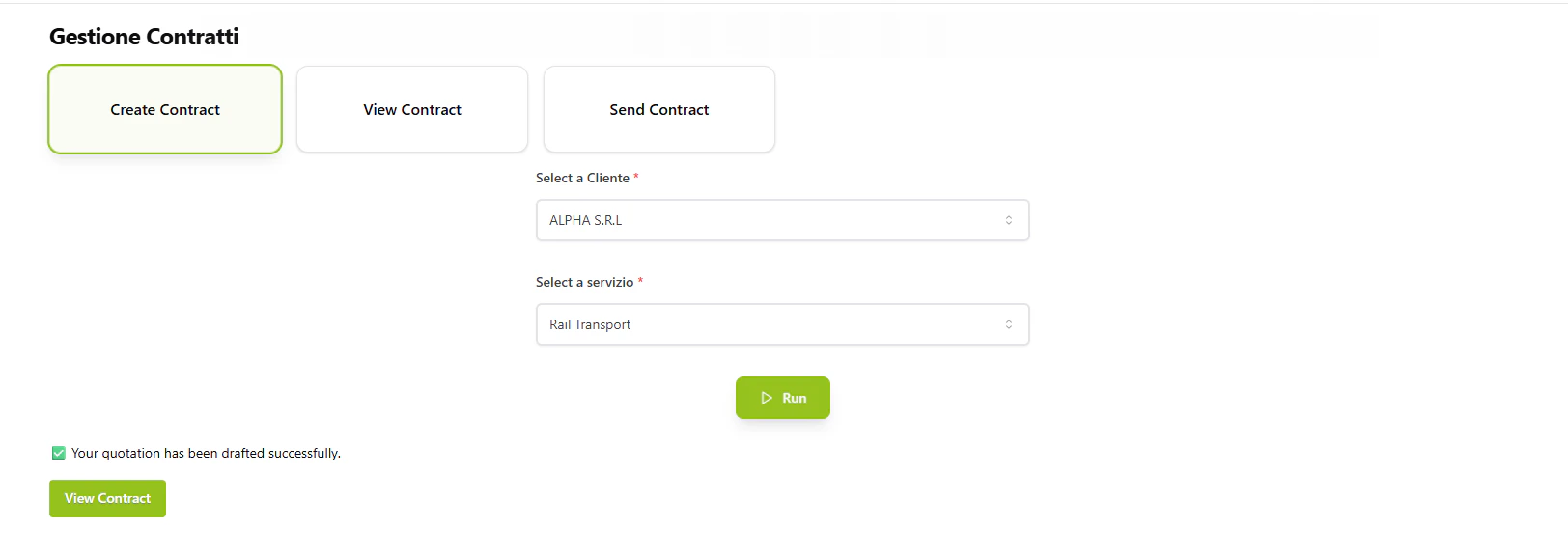
* Client selection from available database
* Service selection (Rail Transport, Road Freight, Warehouse Storage)
* Automated contract ID generation
* Professional PDF formatting with AlpeAdria branding
 ### PDF Generation
* Company logo and footer integration
* Client contact details and address
* Service description and terms
* Payment terms and signature sections
### Email Integration
* Routes through Communication flow for delivery
* Attaches PDF contract as email attachment
* Updates contract status upon successful delivery
## Commands
### Create Contract
Creates a new contract draft with selected client and service.
**Inputs:**
```json theme={null}
{
"Cliente": "ALPHA S.R.L",
"service": "Rail Transport"
}
```
**Output:** Success message with link to view the drafted contract
### View Contract
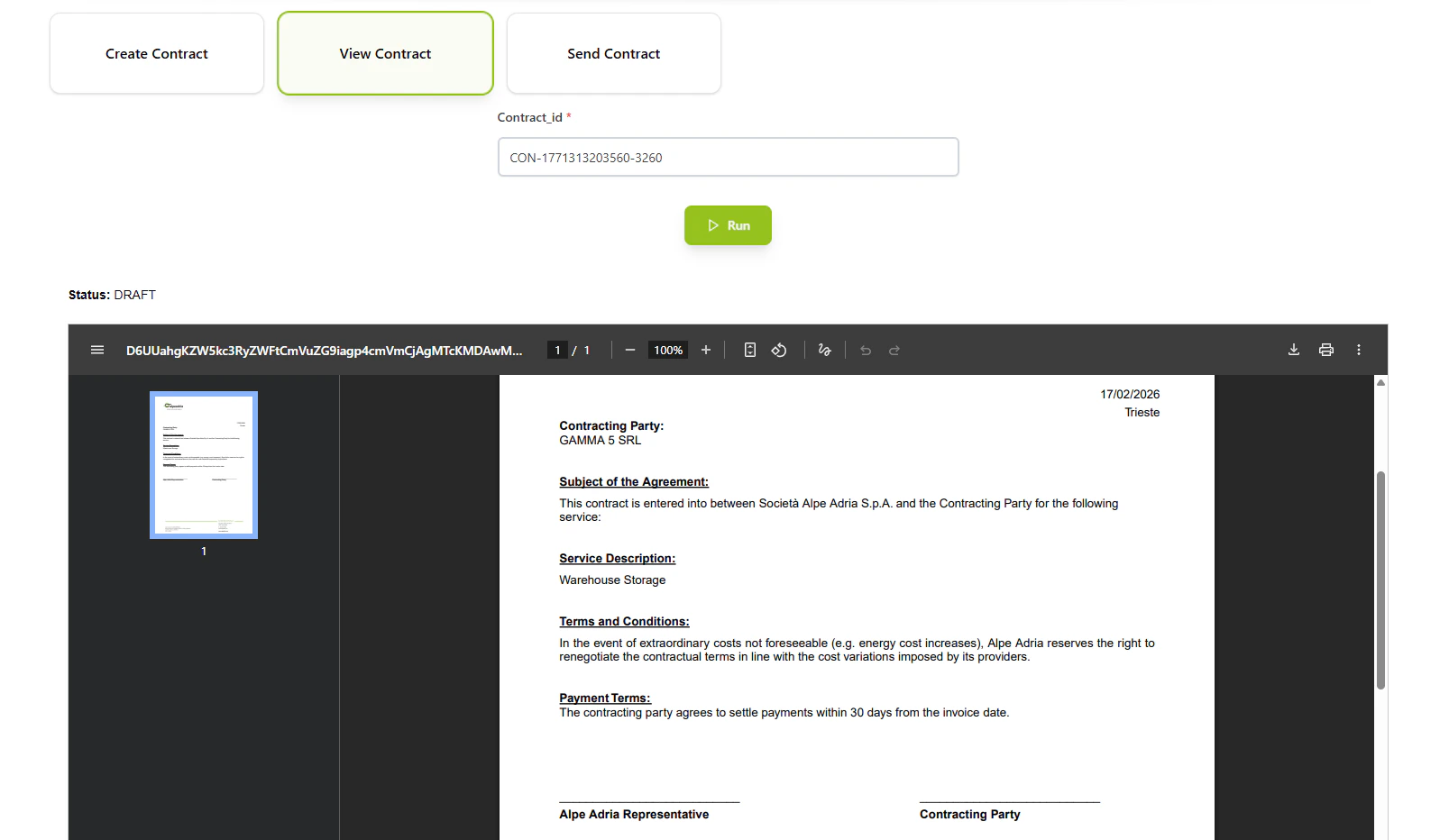
Displays the contract PDF with an option to send.
**Inputs:**
```json theme={null}
{
"contract_id": "CON-1234567890-5678"
}
```
**Output:** Embedded PDF viewer with contract details and send button
### Send Contract
Sends the contract to the client via email.
**Inputs:**
```json theme={null}
{
"contract_id": "CON-1234567890-5678"
}
```
**Output:** Email delivery confirmation and status update
## How to Use
### Create a Contract
Select a client and service to generate a new contract draft. The system creates a unique contract ID and generates a PDF.
### Review the Contract
Use the "View Contract" command with the contract ID to preview the PDF document before sending.
### Send to Client
Once reviewed, use "Send Contract" to deliver the PDF to the client's email address for signature.
### PDF Generation
* Company logo and footer integration
* Client contact details and address
* Service description and terms
* Payment terms and signature sections
### Email Integration
* Routes through Communication flow for delivery
* Attaches PDF contract as email attachment
* Updates contract status upon successful delivery
## Commands
### Create Contract
Creates a new contract draft with selected client and service.
**Inputs:**
```json theme={null}
{
"Cliente": "ALPHA S.R.L",
"service": "Rail Transport"
}
```
**Output:** Success message with link to view the drafted contract
### View Contract
Displays the contract PDF with an option to send.
**Inputs:**
```json theme={null}
{
"contract_id": "CON-1234567890-5678"
}
```
**Output:** Embedded PDF viewer with contract details and send button
### Send Contract
Sends the contract to the client via email.
**Inputs:**
```json theme={null}
{
"contract_id": "CON-1234567890-5678"
}
```
**Output:** Email delivery confirmation and status update
## How to Use
### Create a Contract
Select a client and service to generate a new contract draft. The system creates a unique contract ID and generates a PDF.
### Review the Contract
Use the "View Contract" command with the contract ID to preview the PDF document before sending.
### Send to Client
Once reviewed, use "Send Contract" to deliver the PDF to the client's email address for signature.
 ## Technical Details
**Database:**
* Contracts: `datalake_main.db_ai-loop_contract`
* Client Data: `datalake_main.db_ai-loop_anagrafica_completa`
**Available Services:**
* Rail Transport
* Road Freight
* Warehouse Storage
## Technical Details
**Database:**
* Contracts: `datalake_main.db_ai-loop_contract`
* Client Data: `datalake_main.db_ai-loop_anagrafica_completa`
**Available Services:**
* Rail Transport
* Road Freight
* Warehouse Storage