> ## Documentation Index
> Fetch the complete documentation index at: https://docs.wavecentric.ai/llms.txt
> Use this file to discover all available pages before exploring further.
# Customers
> Centralized customer database with integrated CreditSafe financial reports and network visualization.
**Customers** provides comprehensive management of client and business data, integrating financial reports from CreditSafe. View, search, and update customer information with detailed credit risk assessments.
## Workflow Visualization
```mermaid theme={null}
graph TD
User([User Opens Customers]) --> Choice{Action Type}
Choice -->|View All| FetchAll[Fetch All Customers from DB]
Choice -->|Search| SearchAuto[Autocomplete Search]
Choice -->|Network| ViewNetwork[View Company Network Graph]
FetchAll --> DisplayTable[Display Customer Table]
SearchAuto --> SelectCustomer[Select Customer]
DisplayTable --> Actions{User Action}
SelectCustomer --> DisplayDetails[Display Customer Details]
Actions -->|View Report| CheckReport{Has CreditSafe ID?}
Actions -->|Edit| EditDB[Edit in Database]
Actions -->|Update| UpdateFlow[Update Report Flow]
CheckReport -->|Yes| FetchReport[Retrieve CreditSafe Report]
CheckReport -->|No| NoReport[No Report Available]
FetchReport --> DisplayReport[Show Financial Report
Risk Score, Credit Limit
Financials, Group Structure]
UpdateFlow --> HasID{Has CreditSafe ID?}
HasID -->|Yes| AutoUpdate[Auto-fetch from CreditSafe API]
HasID -->|No| SearchCompany[Search CreditSafe
by Name & Country]
SearchCompany --> SelectCompany[Select Company]
SelectCompany --> LinkReport[Link CreditSafe ID & Fetch Report]
AutoUpdate --> UpdateDB[Update Database with Latest Data]
LinkReport --> UpdateDB
UpdateDB --> Success[Show Updated Report]
ViewNetwork --> GraphViz[Interactive Network Graph
Companies & Users]
EditDB --> SaveChanges[Save to db_ai-loop_V3_business]
SaveChanges --> Refresh[Refresh Customer List]
```
## What It Does
The Customers system enables you to:
* **View All Customers**: Display complete customer database in an interactive table
* **Search Customers**: Find specific clients by name, email, city, or CreditSafe ID
* **Financial Reports**: Access integrated CreditSafe credit reports and risk assessments
* **Update Reports**: Refresh customer financial data from CreditSafe
* **Network Visualization**: See company relationships and connected users in an interactive graph
## Key Features
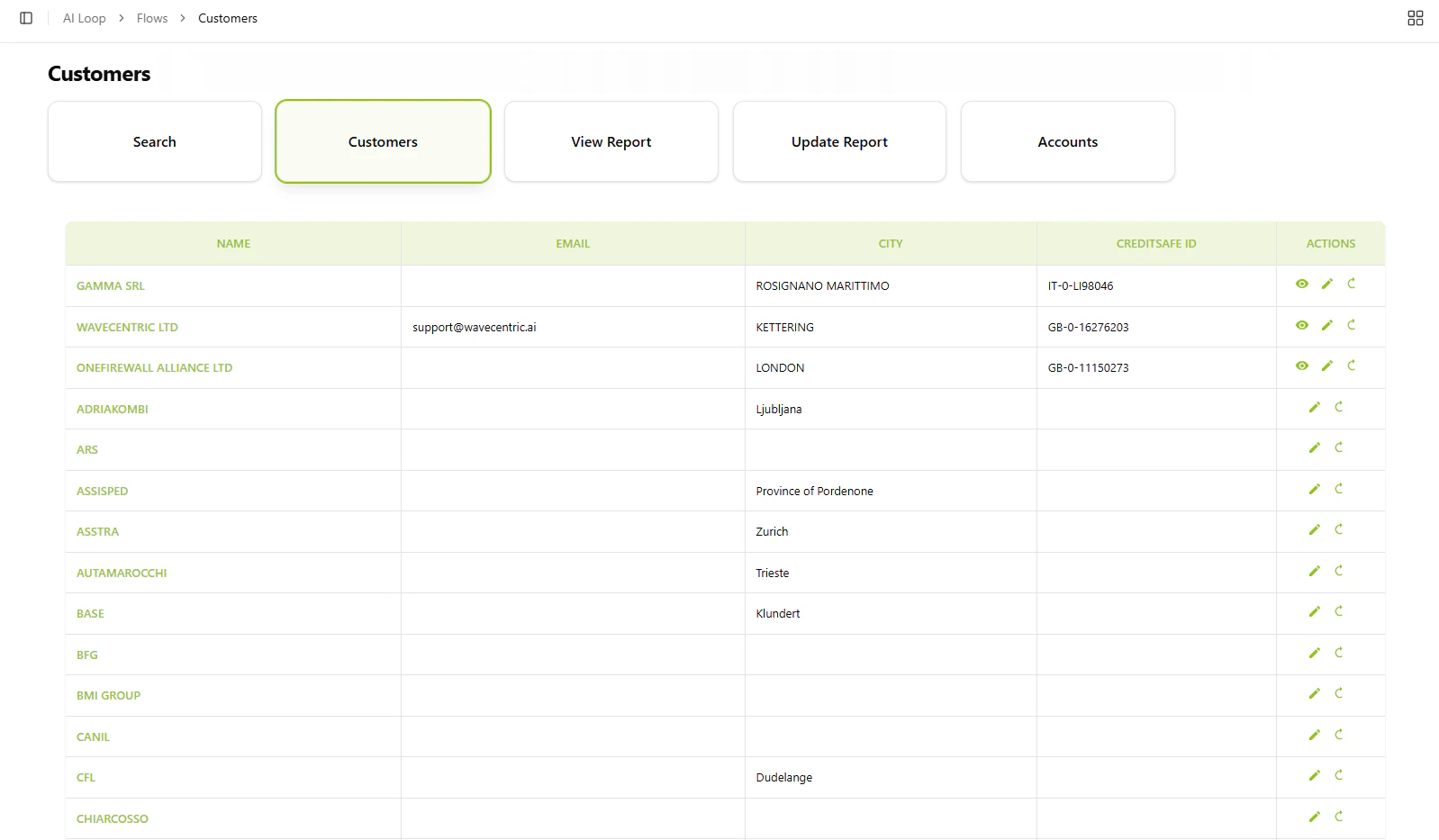
### Customer Table
Browse all customers with essential information:
* Business name and contact details
* Location (city/country)
* CreditSafe ID for financial tracking
* Quick actions: View report, Edit data, Update from CreditSafe
 [Open Customers →](https://ai-loop.alpeadria.com/ai-loop/flows?group=CENTRICO\&flow=customers)
### Search Functionality
Autocomplete search across customer database fields to quickly locate specific clients or businesses.
[Open Customers →](https://ai-loop.alpeadria.com/ai-loop/flows?group=CENTRICO\&flow=customers)
### Search Functionality
Autocomplete search across customer database fields to quickly locate specific clients or businesses.
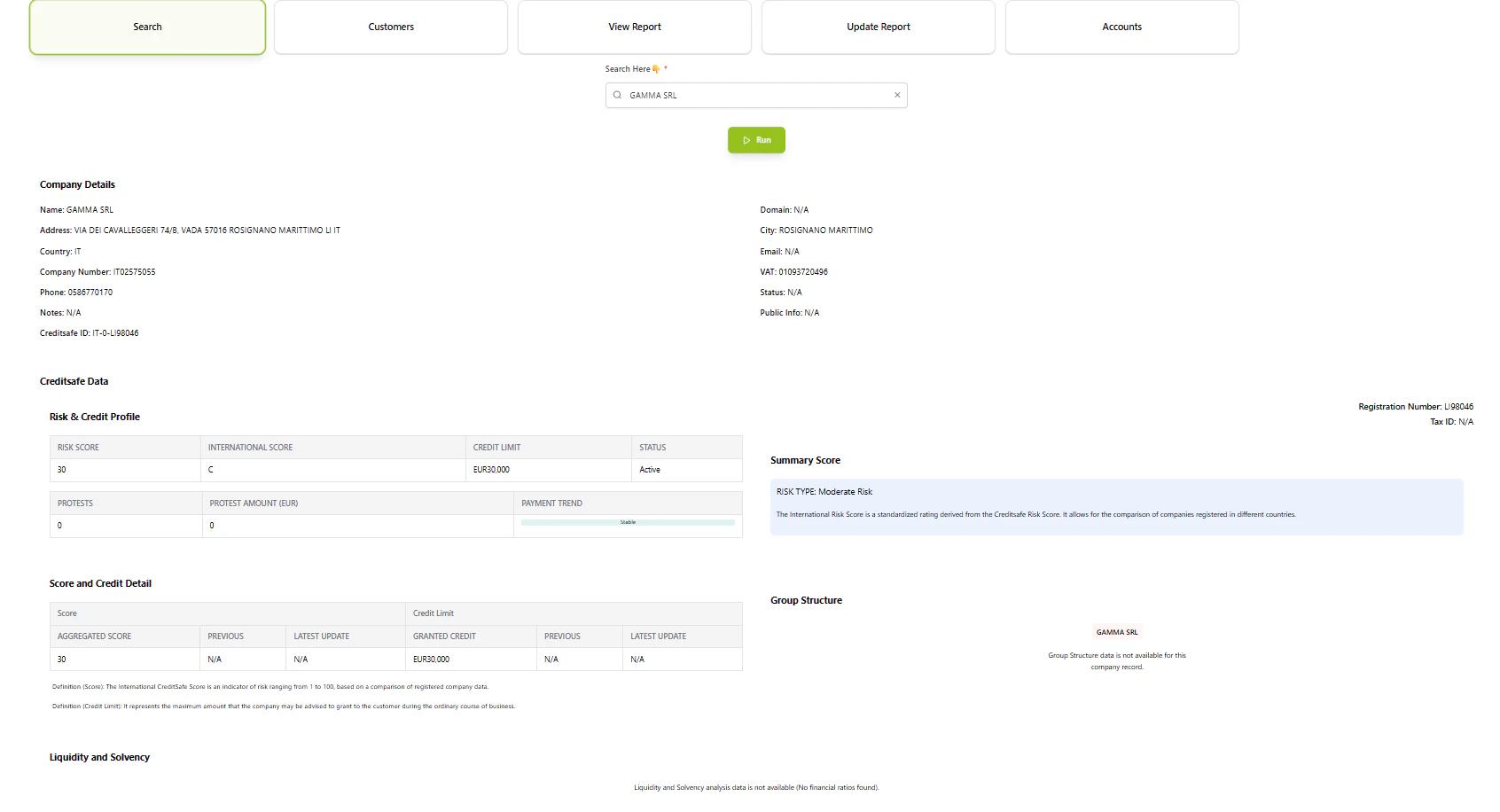 ### Credit Reports
Access detailed financial analysis for each customer including:
* Risk score and international credit rating
* Credit limit recommendations
* Financial statements and liquidity analysis
* Group structure and parent companies
* Payment trends and protest history
### Report Management
* **View Report**: Display comprehensive CreditSafe financial assessment
* **Update Report**: Fetch latest data from CreditSafe API
* **Manual Entry**: Add CreditSafe ID for customers without linked reports
### Network Graph
Visualize organizational relationships showing companies and their connected user accounts in an interactive network diagram.
### Credit Reports
Access detailed financial analysis for each customer including:
* Risk score and international credit rating
* Credit limit recommendations
* Financial statements and liquidity analysis
* Group structure and parent companies
* Payment trends and protest history
### Report Management
* **View Report**: Display comprehensive CreditSafe financial assessment
* **Update Report**: Fetch latest data from CreditSafe API
* **Manual Entry**: Add CreditSafe ID for customers without linked reports
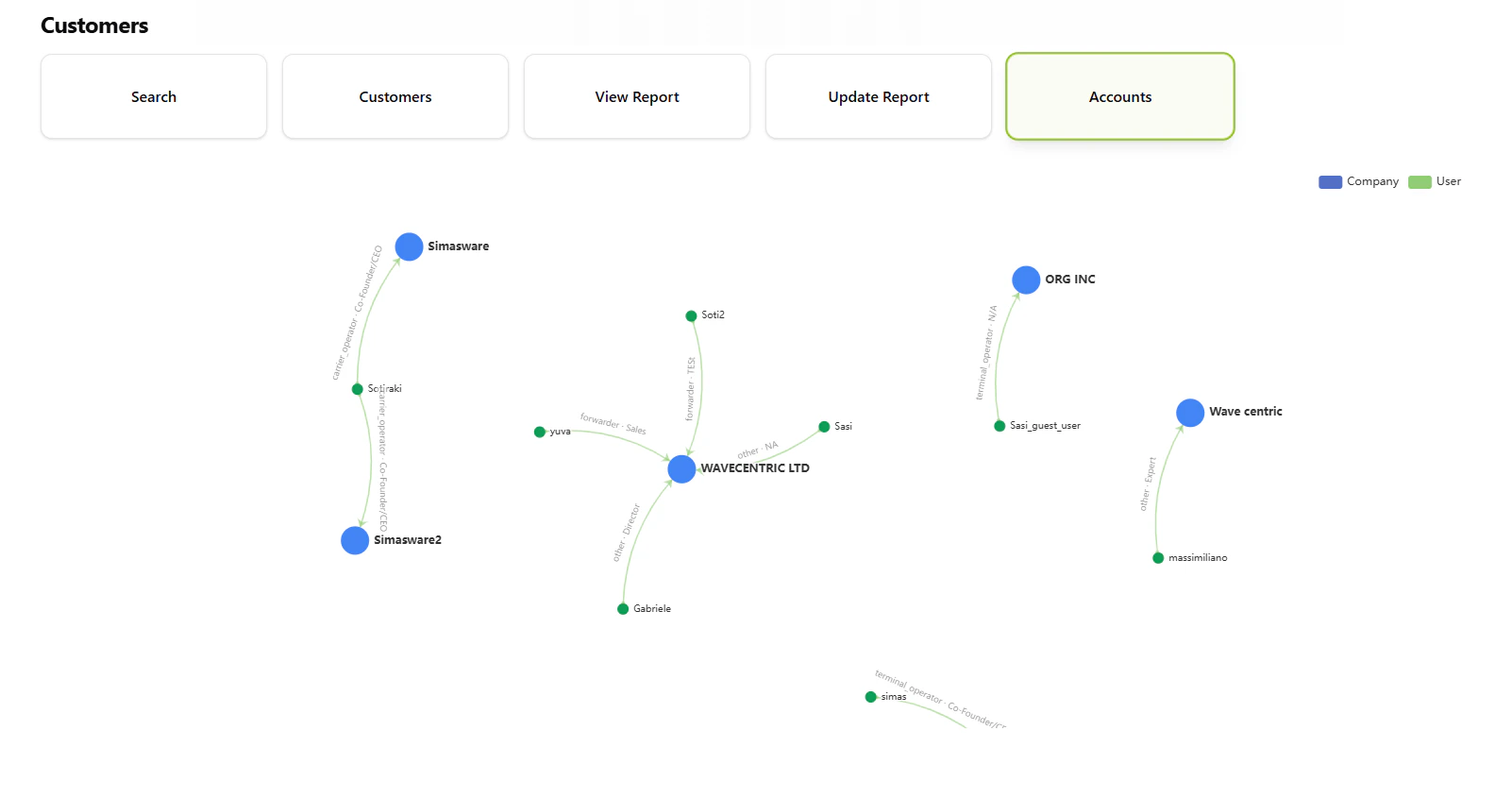
### Network Graph
Visualize organizational relationships showing companies and their connected user accounts in an interactive network diagram.
 ## How to Use
### View Customer List
Select "Customers" to display the complete table of all clients with name, email, city, and CreditSafe ID.
### Search Specific Customer
Use the search function with autocomplete to find customers by any field. Results display detailed information.
### Access Financial Report
Click the **View** icon next to any customer with a CreditSafe ID to see their complete credit report with risk analysis.
### Update Customer Data
* Click **Edit** to modify customer details in the database
* Click **Update** to fetch fresh data from CreditSafe
* For new CreditSafe links, enter company name and country to search and select
## Database Integration
Customer data is stored in `db_ai-loop_V3_business` with fields including:
* Business name, email, contact information
* Location data (city, country code)
* CreditSafe ID for financial report linking
* Full CreditSafe report data (risk scores, financials, group structure)
## How to Use
### View Customer List
Select "Customers" to display the complete table of all clients with name, email, city, and CreditSafe ID.
### Search Specific Customer
Use the search function with autocomplete to find customers by any field. Results display detailed information.
### Access Financial Report
Click the **View** icon next to any customer with a CreditSafe ID to see their complete credit report with risk analysis.
### Update Customer Data
* Click **Edit** to modify customer details in the database
* Click **Update** to fetch fresh data from CreditSafe
* For new CreditSafe links, enter company name and country to search and select
## Database Integration
Customer data is stored in `db_ai-loop_V3_business` with fields including:
* Business name, email, contact information
* Location data (city, country code)
* CreditSafe ID for financial report linking
* Full CreditSafe report data (risk scores, financials, group structure)