> ## Documentation Index
> Fetch the complete documentation index at: https://docs.wavecentric.ai/llms.txt
> Use this file to discover all available pages before exploring further.
# Data Viewer
> Database export and visualization tool with CSV/HTML conversion, AI-powered summaries, and email delivery.
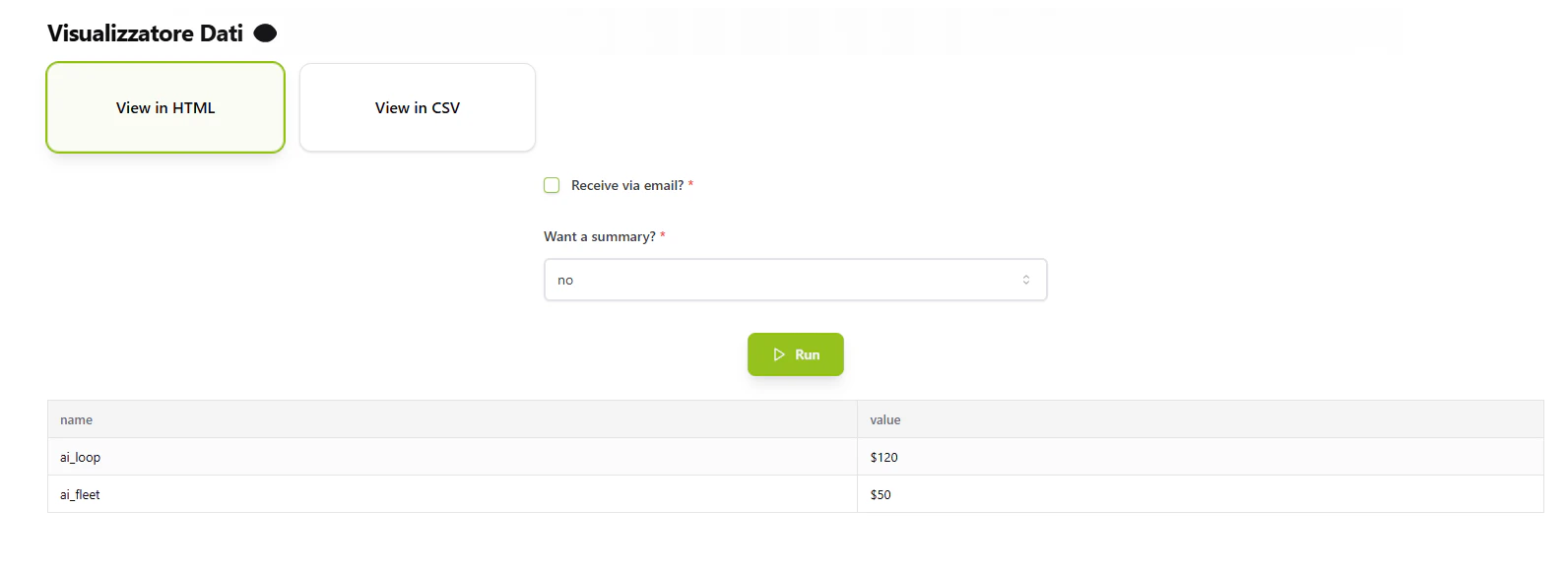
**Data Viewer** (Visualizzatore Dati) converts database data into downloadable CSV files or formatted HTML reports with optional AI summaries and email delivery.
## Workflow Visualization
```mermaid theme={null}
graph TD
User([User Sends Request]) --> LogActivity[Log User Activity]
LogActivity --> CheckCommand{Command Type}
CheckCommand -->|View in HTML| HTMLPath[HTML Export Path]
CheckCommand -->|View in CSV| CSVPath[CSV Export Path]
HTMLPath --> FetchData1[Fetch Data from MongoDB]
CSVPath --> FetchData2[Fetch Data from MongoDB]
FetchData1 --> SummaryCheck{Want Summary?}
SummaryCheck -->|Yes| GenerateAI[Generate AI Summary]
SummaryCheck -->|No| CreateHTML2[Create HTML Table]
GenerateAI --> CreateHTML1[Create HTML Table
with Summary]
CreateHTML1 --> EmailCheck1{Send via Email?}
CreateHTML2 --> EmailCheck1
EmailCheck1 -->|Yes| SendHTML[Send HTML Email]
EmailCheck1 -->|No| ReturnHTML[Return HTML Response]
FetchData2 --> ConvertCSV[Convert to CSV]
ConvertCSV --> EmailCheck2{Send via Email?}
EmailCheck2 -->|Yes| SendCSV[Send CSV Attachment]
EmailCheck2 -->|No| ReturnLink[Return Download Link]
```
## What It Does
* **Export to CSV**: Convert database collections to downloadable CSV files
* **Generate HTML Reports**: Create formatted HTML tables with optional summaries
* **AI Summaries**: Use AI model to generate 2-3 sentence data summaries
* **Email Delivery**: Send reports directly to specified email addresses
* **Activity Tracking**: Log all user requests and commands to MongoDB
 [Open Data Viewer →](https://ai-loop.alpeadria.com/ai-loop/flows?flow=visualizzatore-dati\&command=view-in-html)
## Key Features
### CSV Export
* Fetches data from MongoDB collection
* Converts to CSV format
* Creates downloadable file or sends via email
### HTML Reports
* Generates formatted HTML table
* Dynamic column headers from data
* Optional AI-generated summary
### Email Integration
* Professional email template with company branding
* HTML reports embedded in email body
* CSV files attached as attachments
* Sender: Admin Team ([no-reply@mail.wavecentric.ai](mailto:no-reply@mail.wavecentric.ai))
## How to Use
### Choose Export Format
**For CSV Export:**
Send request with command: `"View in CSV"`
**For HTML Report:**
Send request with command: `"View in HTML"`
### Configure Options
**Email Delivery (Optional):**
* Set `get_via_email`: `true`
* Provide `recipient_email`: valid email address
**AI Summary (HTML only):**
* Set `get_summary`: `"yes"` for AI-generated summary
* Set `get_summary`: `"no"` to skip summary
### Receive Results
**Email delivery:**
* CSV: Download attachment from email
* HTML: View inline report in email
**Direct response:**
* CSV: Receive download link
* HTML: Receive formatted HTML
## Command Structure
### View in HTML
```json theme={null}
{
"get_via_email": false,
"recipient_email": "user@example.com",
"get_summary": "yes"
}
```
**Options:**
* `get_via_email` (boolean, required): Send via email?
* `recipient_email` (string, optional): Email address
* `get_summary` (string, required): "yes" or "no"
### View in CSV
```json theme={null}
{
"get_via_email": false,
"recipient_email": "user@example.com"
}
```
**Options:**
* `get_via_email` (boolean, required): Send via email?
* `recipient_email` (string, optional): Email address
## Technical Details
**Database Source:**
* Database: `datalake_main`
* Collection: `db_ai-loop_service.products`
**Activity Logging:**
* Collection: `db_ai-loop_flow_Logs`
* Logs user details and flow commands
**Email:**
* Sender: [no-reply@mail.wavecentric.ai](mailto:no-reply@mail.wavecentric.ai)
* Subject: "Database details"
[Open Data Viewer →](https://ai-loop.alpeadria.com/ai-loop/flows?flow=visualizzatore-dati\&command=view-in-html)
## Key Features
### CSV Export
* Fetches data from MongoDB collection
* Converts to CSV format
* Creates downloadable file or sends via email
### HTML Reports
* Generates formatted HTML table
* Dynamic column headers from data
* Optional AI-generated summary
### Email Integration
* Professional email template with company branding
* HTML reports embedded in email body
* CSV files attached as attachments
* Sender: Admin Team ([no-reply@mail.wavecentric.ai](mailto:no-reply@mail.wavecentric.ai))
## How to Use
### Choose Export Format
**For CSV Export:**
Send request with command: `"View in CSV"`
**For HTML Report:**
Send request with command: `"View in HTML"`
### Configure Options
**Email Delivery (Optional):**
* Set `get_via_email`: `true`
* Provide `recipient_email`: valid email address
**AI Summary (HTML only):**
* Set `get_summary`: `"yes"` for AI-generated summary
* Set `get_summary`: `"no"` to skip summary
### Receive Results
**Email delivery:**
* CSV: Download attachment from email
* HTML: View inline report in email
**Direct response:**
* CSV: Receive download link
* HTML: Receive formatted HTML
## Command Structure
### View in HTML
```json theme={null}
{
"get_via_email": false,
"recipient_email": "user@example.com",
"get_summary": "yes"
}
```
**Options:**
* `get_via_email` (boolean, required): Send via email?
* `recipient_email` (string, optional): Email address
* `get_summary` (string, required): "yes" or "no"
### View in CSV
```json theme={null}
{
"get_via_email": false,
"recipient_email": "user@example.com"
}
```
**Options:**
* `get_via_email` (boolean, required): Send via email?
* `recipient_email` (string, optional): Email address
## Technical Details
**Database Source:**
* Database: `datalake_main`
* Collection: `db_ai-loop_service.products`
**Activity Logging:**
* Collection: `db_ai-loop_flow_Logs`
* Logs user details and flow commands
**Email:**
* Sender: [no-reply@mail.wavecentric.ai](mailto:no-reply@mail.wavecentric.ai)
* Subject: "Database details"