> ## Documentation Index
> Fetch the complete documentation index at: https://docs.wavecentric.ai/llms.txt
> Use this file to discover all available pages before exploring further.
# Preview & Send
> Final verification and transmission of tailor-made quotation offers.
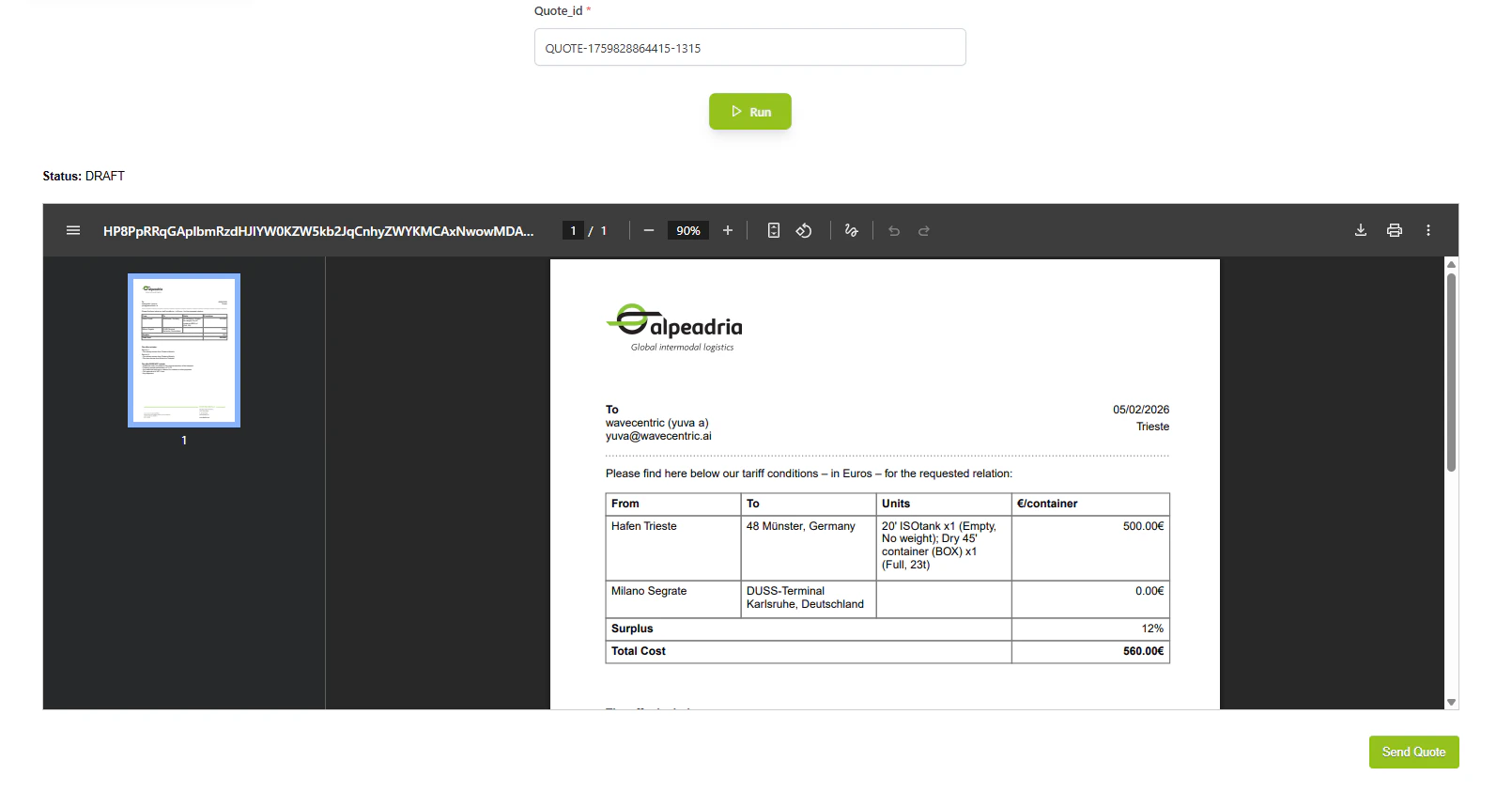
**Preview & Send** is the final stage in the quotation workflow, rendering verified data into a professional template and enabling one-click transmission to customers.
## Workflow Visualization
```mermaid theme={null}
graph TD
Admin([Admin Selects
Verified Quotation]) --> LoadData[Load Quotation
Data]
LoadData --> PopulateTemplate[Populate Quotation
Template]
PopulateTemplate --> RenderPreview[Render Professional
PDF Preview]
RenderPreview --> Display[Display Preview
to Admin]
Display --> Review{Review
Complete?}
Review -->|Need Changes| BackToEdit[Return to
Edit Mode]
BackToEdit --> LoadData
Review -->|Approved| SendAction[Click Send Button]
SendAction --> PrepareEmail[Prepare Email
with PDF Attachment]
PrepareEmail --> SendToCustomer[Send to Customer
Email]
SendToCustomer --> UpdateStatus[Update Status
to SENT]
UpdateStatus --> LogComm[Log in Communication
Database]
LogComm --> Success[Transmission
Complete]
```
## What It Does
* **Template Rendering**: Dynamically populates quotation template with inquiry details
* **Professional Formatting**: Ensures uniform, branded appearance for all offers
* **Final Verification**: Allows last review before customer transmission
* **One-Click Send**: Single action to transmit offer to customer
* **Status Updates**: Automatically updates quotation status in dashboard
## Key Features
### Template Rendering
* **Dynamic Content**: Customer details, service specifications, final pricing
* **Professional Formatting**: Uniform and branded quotation appearance
* **PDF Generation**: High-quality, print-ready quotation documents
### One-Click Transmission
* **Send Action**: Single click triggers transmission via preferred channel
* **Flow Integration**: Completes quotation workflow and updates dashboard
* **Email Delivery**: Sends quotation as PDF attachment to customer
 ## How to Use
### Open Preview
From Quotation View, select a verified quotation and click Preview.
### Review Template
Verify all details are correct: customer info, services, routes, and pricing breakdown.
### Send to Customer
Click the Send button to transmit the quotation via email with PDF attachment.
### Confirmation
System updates status to SENT and logs the communication in the database.
## Technical Details
**Database:**
* Quotations: `datalake_main.db_ai-loop_CRM_Inquiries`
* Communications: `datalake_main.db_ai-loop_message_communication`
**Status Flow:**
* COST\_CALCULATED → VERIFIED → SENT
## How to Use
### Open Preview
From Quotation View, select a verified quotation and click Preview.
### Review Template
Verify all details are correct: customer info, services, routes, and pricing breakdown.
### Send to Customer
Click the Send button to transmit the quotation via email with PDF attachment.
### Confirmation
System updates status to SENT and logs the communication in the database.
## Technical Details
**Database:**
* Quotations: `datalake_main.db_ai-loop_CRM_Inquiries`
* Communications: `datalake_main.db_ai-loop_message_communication`
**Status Flow:**
* COST\_CALCULATED → VERIFIED → SENT