> ## Documentation Index
> Fetch the complete documentation index at: https://docs.wavecentric.ai/llms.txt
> Use this file to discover all available pages before exploring further.
# Sales Funnel
> Track and manage your sales pipeline visually.
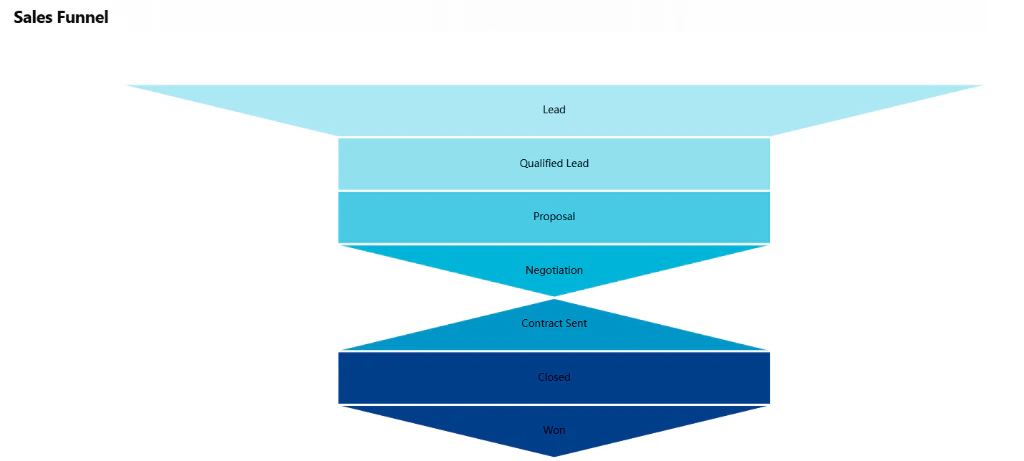
**Sales Funnel** provides a visual overview of the sales pipeline, enabling data-driven lead tracking from initial qualification through to successful conversion.
## Workflow Visualization
```mermaid theme={null}
graph TD
User([User Executes
Funnel Command]) --> FetchConfig[Fetch Funnel Config
from CRM Configs]
FetchConfig --> FetchCounts[Count Inquiries
per Funnel Stage]
FetchCounts --> MergeData[Merge Config
with Counts]
MergeData --> RenderChart[Render Interactive
Funnel Chart]
RenderChart --> Display[Display Funnel
Visualization]
Display --> Click{User Clicks
Stage}
Click --> ViewDetails[View Inquiries
in That Stage]
```
## Funnel Stages
The sales process is organized into distinct stages to provide clear visibility into your pipeline:
* **Lead**: Initial contact or inquiry
* **Qualified Lead**: Leads identified as a fit for your services
* **Proposal**: Active service offer and pricing submission
* **Negotiation**: Review and refinement of the proposal details
* **Contract Sent**: Formal agreement awaiting final authorization
* **Closed**: The finalization of the negotiation process
* **Won**: Successful conversion and commencement of the partnership
## Customer Insights
From the Sales Funnel, you can dive deep into individual customer profiles:
* **Communication History**: View all past messages and interactions with a specific lead
* **Task Overview**: See all open and completed tasks associated with the account
* **Inquiry History**: Track all service requests submitted by the customer
* **Business Analysis**: Access comprehensive reports and data analysis for each company
 ## Commands
### Funnel
Displays the sales funnel chart with current inquiry counts per stage.
**Output:** Interactive HTML funnel chart
## How to Use
### Execute Command
Run the "Funnel" command to generate the visualization.
### View Pipeline
See distribution of leads across all funnel stages with live counts.
### Navigate to Stage
Click any funnel stage to view detailed inquiry list for that stage.
## Technical Details
**Database:**
* Funnel Config: `datalake_main.db_ai-loop_CRM_Configs`
* Inquiries: `datalake_main.db_ai-loop_CRM_Inquiries`
## Commands
### Funnel
Displays the sales funnel chart with current inquiry counts per stage.
**Output:** Interactive HTML funnel chart
## How to Use
### Execute Command
Run the "Funnel" command to generate the visualization.
### View Pipeline
See distribution of leads across all funnel stages with live counts.
### Navigate to Stage
Click any funnel stage to view detailed inquiry list for that stage.
## Technical Details
**Database:**
* Funnel Config: `datalake_main.db_ai-loop_CRM_Configs`
* Inquiries: `datalake_main.db_ai-loop_CRM_Inquiries`