> ## Documentation Index
> Fetch the complete documentation index at: https://docs.wavecentric.ai/llms.txt
> Use this file to discover all available pages before exploring further.
# Membership & Account Management
> Manage your professional profile and customize your workspace.
## Personal Profile
Your profile details provide the necessary context for collaborative logistics orchestration.
### Core Identity
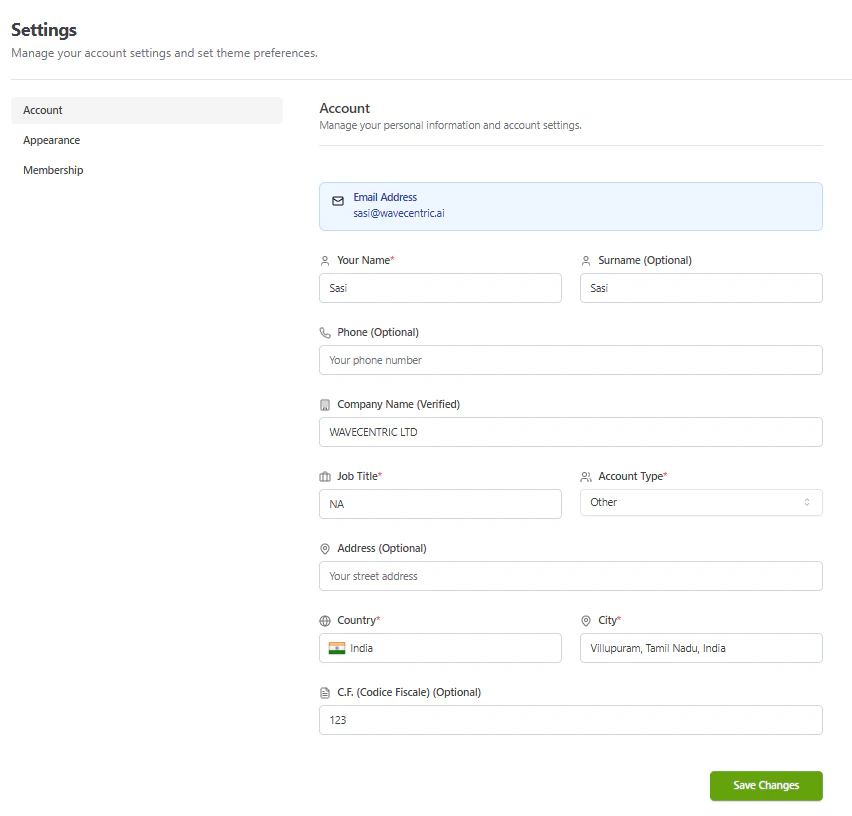
* **Name & Surname**: Maintain your full professional name for clear identification in tasks and inquiries.
* **Contact Details**: Update your email (managed via magic links) and optional phone number.
* **Job Title & Account Type**: Specify your professional role and industry category (e.g., Shipper, Forwarder, Carrier) to optimize platform features.
* **Tax Identification**: Provide your **C.F. (Codice Fiscale)** or relevant tax ID for institutional compliance where required.
### Company & Verification
* **Verified Standing**: Your organization's name is displayed with a **(Verified)** status once authenticated, ensuring trust within the logistics network.
* **Institutional Alignment**: Verified company details are locked to maintain the integrity of the corporate registry.
 ## Workspace Customization
Tailor the visual environment to match your professional workflow:
* **Appearance**: Toggle between Light and Dark modes or select high-performance themes (Slate, Rose, Lime).
* **Membership Level**: Instantly identify your access tier (**Admin** vs. **Guest**) within the organization.
## User Menu & Session Management
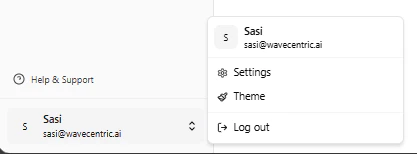
The user profile menu, located at the bottom of the primary navigation sidebar, provides quick access to account controls and session management.
### User Menu Options
* **Profile Overview**: View your active email and profile avatar.
* **Settings**: Direct access to your [Account & Membership Settings](/functionalities/membership-account-management).
* **Theme Selection**: Toggle between Light, Dark, and high-contrast visual modes.
* **Log Out**: Securely terminate your active session and redirect to the login portal.
## Workspace Customization
Tailor the visual environment to match your professional workflow:
* **Appearance**: Toggle between Light and Dark modes or select high-performance themes (Slate, Rose, Lime).
* **Membership Level**: Instantly identify your access tier (**Admin** vs. **Guest**) within the organization.
## User Menu & Session Management
The user profile menu, located at the bottom of the primary navigation sidebar, provides quick access to account controls and session management.
### User Menu Options
* **Profile Overview**: View your active email and profile avatar.
* **Settings**: Direct access to your [Account & Membership Settings](/functionalities/membership-account-management).
* **Theme Selection**: Toggle between Light, Dark, and high-contrast visual modes.
* **Log Out**: Securely terminate your active session and redirect to the login portal.