> ## Documentation Index
> Fetch the complete documentation index at: https://docs.wavecentric.ai/llms.txt
> Use this file to discover all available pages before exploring further.
# Task Management
> Organize your workflow with a collaborative, multi-view task manager.
The **Task Management** system is a powerful coordination tool that ensures inquiry follow-up is never missed. It provides a shared workspace with flexible visualization.
## Strategic Task Management
### Inline Task Creation
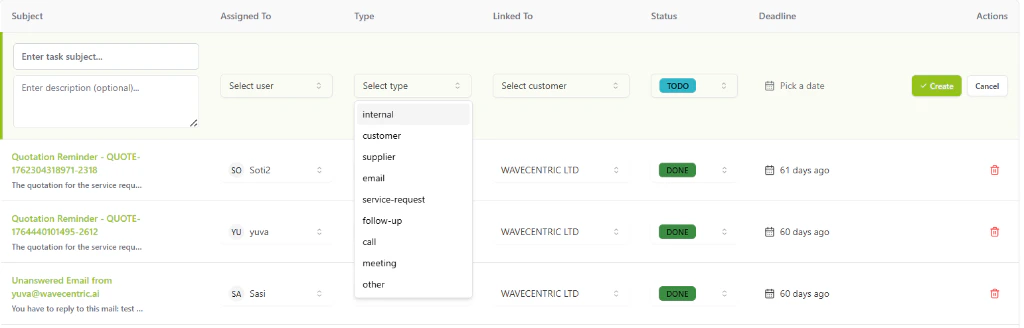
Generate new operational tasks directly within the high-density list view or Kanban board to maintain workflow momentum:
* **Comprehensive Data Entry**: Define task **Subjects** and detailed **Descriptions** to provide full context to assignees.
* **Precision Categorization**: Assign specific task **Types** (e.g., Internal, Customer, Supplier, Email, Service-Request, Follow-up, Call, Meeting).
* **Entitiy Linking**: Associate tasks with specific **Business Partners** or **Customers** directly during creation.
* **Deadline Orchestration**: Utilize the integrated calendar component to set precise operational deadlines.
 ## Three Dimensions of Productivity
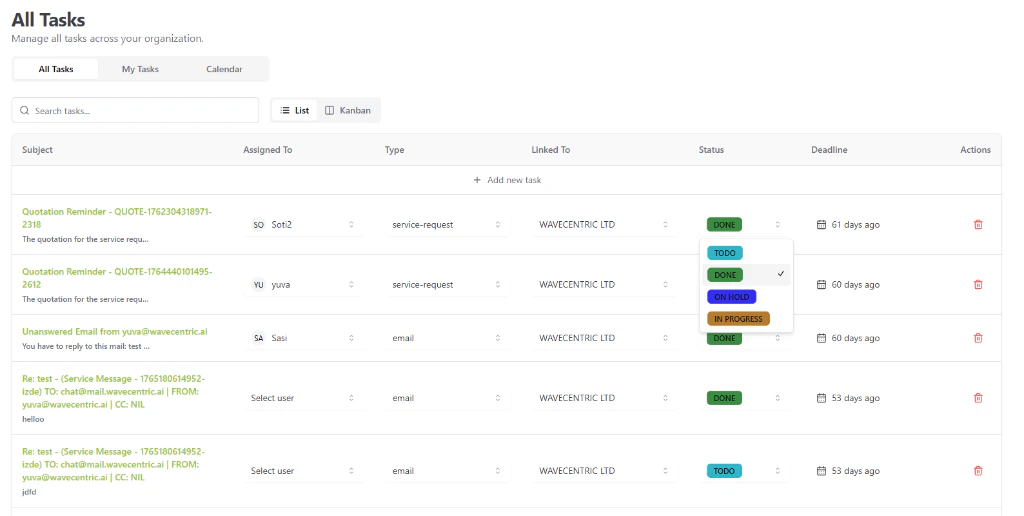
### 1. High-Density List View
For rapid data entry and bulk management:
* **Inline Editing**: Update assignees, task types, linked customers, and statuses directly from the table.
* **Granular Sorting**: Organize your organization's workload by subject, deadline, or priority.
* **Status Orchestration**: Manage tasks through defined lifecycles including **TODO**, **IN PROGRESS**, **ON HOLD**, and **DONE**.
### 2. The Kanban Board
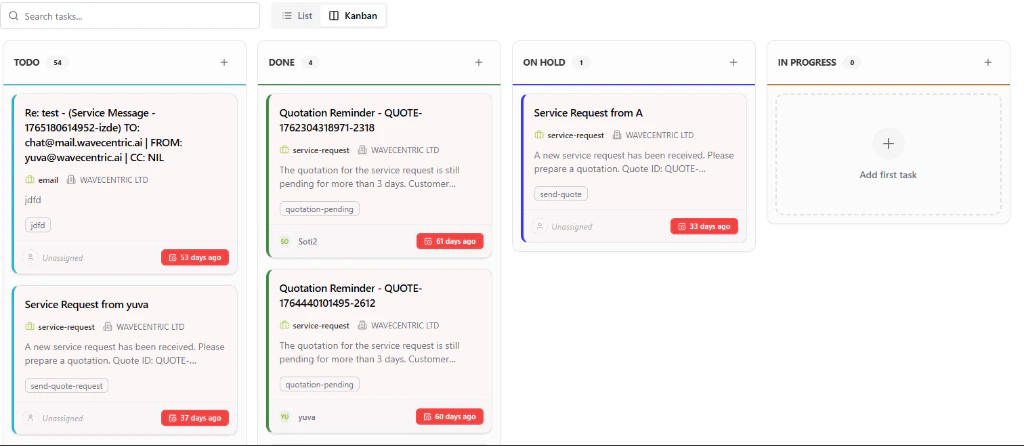
The Kanban view transforms your task list into a visual pipeline, perfect for managing high-volume operations:
* **Drag-and-Drop Workflow**: Instantly update task status by dragging cards between columns.
* **Visual Oversight**: Monitor the distribution of tasks across **TODO**, **DONE**, **ON HOLD**, and **IN PROGRESS** stages.
* **Column-Specific Actions**: Use the **(+)** button in any column to quickly add a task to that specific workflow stage.
## Three Dimensions of Productivity
### 1. High-Density List View
For rapid data entry and bulk management:
* **Inline Editing**: Update assignees, task types, linked customers, and statuses directly from the table.
* **Granular Sorting**: Organize your organization's workload by subject, deadline, or priority.
* **Status Orchestration**: Manage tasks through defined lifecycles including **TODO**, **IN PROGRESS**, **ON HOLD**, and **DONE**.
### 2. The Kanban Board
The Kanban view transforms your task list into a visual pipeline, perfect for managing high-volume operations:
* **Drag-and-Drop Workflow**: Instantly update task status by dragging cards between columns.
* **Visual Oversight**: Monitor the distribution of tasks across **TODO**, **DONE**, **ON HOLD**, and **IN PROGRESS** stages.
* **Column-Specific Actions**: Use the **(+)** button in any column to quickly add a task to that specific workflow stage.
 ### 3. Visual Calendar
Map out your month with the integrated **Task Calendar**:
* **Deadline Visualization**: View your personal workload mapped across the days of the week.
* **Urgency Tracking**: Relative time indicators provide instant context on upcoming commitments.
## Core Features
### Advanced Task UX
* **Micro-Pagination**: Manage hundreds of tasks across columns and views without performance degradation.
* **Instant Search**: Locate specific tasks by subject or linked entity using the global task search engine.
### 3. Visual Calendar
Map out your month with the integrated **Task Calendar**:
* **Deadline Visualization**: View your personal workload mapped across the days of the week.
* **Urgency Tracking**: Relative time indicators provide instant context on upcoming commitments.
## Core Features
### Advanced Task UX
* **Micro-Pagination**: Manage hundreds of tasks across columns and views without performance degradation.
* **Instant Search**: Locate specific tasks by subject or linked entity using the global task search engine.