> ## Documentation Index
> Fetch the complete documentation index at: https://docs.wavecentric.ai/llms.txt
> Use this file to discover all available pages before exploring further.
# Module Configuration
> Master settings for commodities, documents, and notifications
## 1. Overview
The **Configuration** sub-module defines the operational rules, legal classifications, and communication templates used across the platform. This ensures standardization of goods categorization, document compliance, and automated messaging.
## 2. Commodities (Merci)
The official registry of merchandise types. Commodities are selected during the **Booking** phase and are critical for terminal safety and documentation.
### Key Attributes
* **Codice & Descrizione**: Unique identifier and full commodity name.
* **Logic Mapping**: Commodities are linked to HS/NHM codes for international rail compliance.
* **Operational Intent**: Gross weight defined per commodity in a booking drives the entire rail composition planning logic.
## 3. Document Management
Defines the different types of official paperwork handled by the system (e.g., CIM, Manifest, Bill of Lading).
### Technical Mapping
| Field | Technical Name | Description |
| :------------- | :------------------- | :---------------------------------------------------- |
| **Codice** | `codice` | System ID (e.g., CIM, MRN). |
| **Categoria** | `categoria` | Grouping (Operational, Customs, Financial). |
| **Transito** | `transito` | Flag for shipments requiring customs procedures. |
| **Codici EDI** | `codici_alternativi` | Mapping for external system harmonization (PCS/UIRR). |
## 4. Notification Engine (Mail Config)
Manages the automated outward communication.
### Mail Templates (Modelli Mail)
The system uses **Trigger Keys (Chiave)** to link templates to operational events.
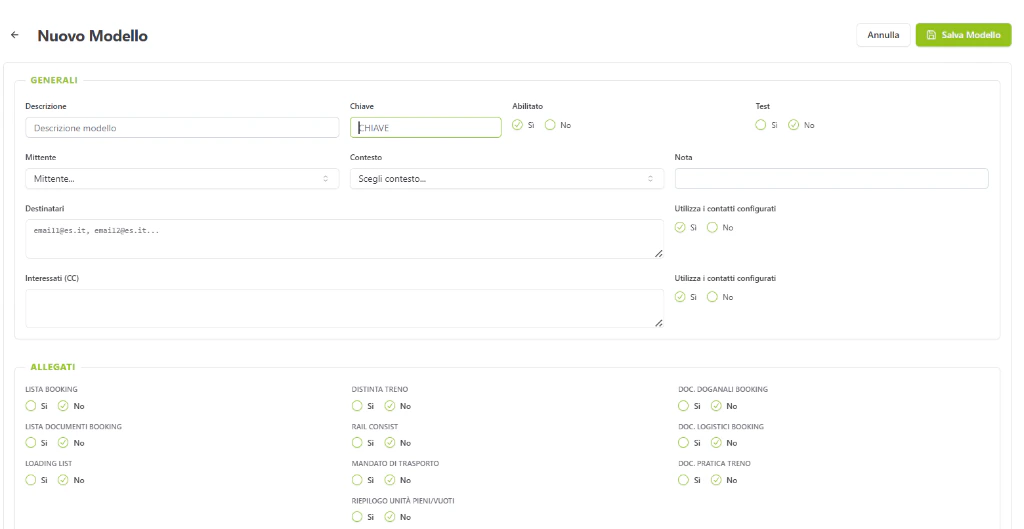 * **Dynamic Content**: IT/EN/FR localized subjects and bodies with WYSIWYG support.
* **Automated Routing**: Toggles like `invio_ufficio_booking` or `invio_clienti` resolve recipients dynamically based on the transaction.
* **Attachments**: Every template can be configured to automatically attach PDF reports (e.g., Booking List, Loading List, Truck Mandate).
### Mail Parameters
Direct configuration for the SMTP relay and global audit rules (BCC overrides).
## 5. Network Logic (Zones)
Groups Nodes into geographic or operational regions.
* **Zoning**: Nodes are grouped via `id_zona` to enable corridor-based reporting.
* **Visibility**: Used for dashboard filtering and role-based data access.
## 6. Connectivity Matrix
```mermaid theme={null}
graph TD
subgraph "Core Rules"
M[Merci Registry] --> BOOK[Booking Validation]
D[Doc Registry] --> EXEC[Execution Manifests]
T[Mail Templates] --> NOT[Notification Engine]
Z[Zones] --> MON[Monitoring Filters]
end
```
* **Dynamic Content**: IT/EN/FR localized subjects and bodies with WYSIWYG support.
* **Automated Routing**: Toggles like `invio_ufficio_booking` or `invio_clienti` resolve recipients dynamically based on the transaction.
* **Attachments**: Every template can be configured to automatically attach PDF reports (e.g., Booking List, Loading List, Truck Mandate).
### Mail Parameters
Direct configuration for the SMTP relay and global audit rules (BCC overrides).
## 5. Network Logic (Zones)
Groups Nodes into geographic or operational regions.
* **Zoning**: Nodes are grouped via `id_zona` to enable corridor-based reporting.
* **Visibility**: Used for dashboard filtering and role-based data access.
## 6. Connectivity Matrix
```mermaid theme={null}
graph TD
subgraph "Core Rules"
M[Merci Registry] --> BOOK[Booking Validation]
D[Doc Registry] --> EXEC[Execution Manifests]
T[Mail Templates] --> NOT[Notification Engine]
Z[Zones] --> MON[Monitoring Filters]
end
```