> ## Documentation Index
> Fetch the complete documentation index at: https://docs.wavecentric.ai/llms.txt
> Use this file to discover all available pages before exploring further.
# Booking Management
> The centralized registry for order processing and unit assignment
## 1. Overview
**Booking Management** is the commercial entry point of the platform. It translates a customer's transport request into a structured system record. Every booking links a **Client** to a specific **Service** and defines the physical **UTIs** and **Cargo** involved.
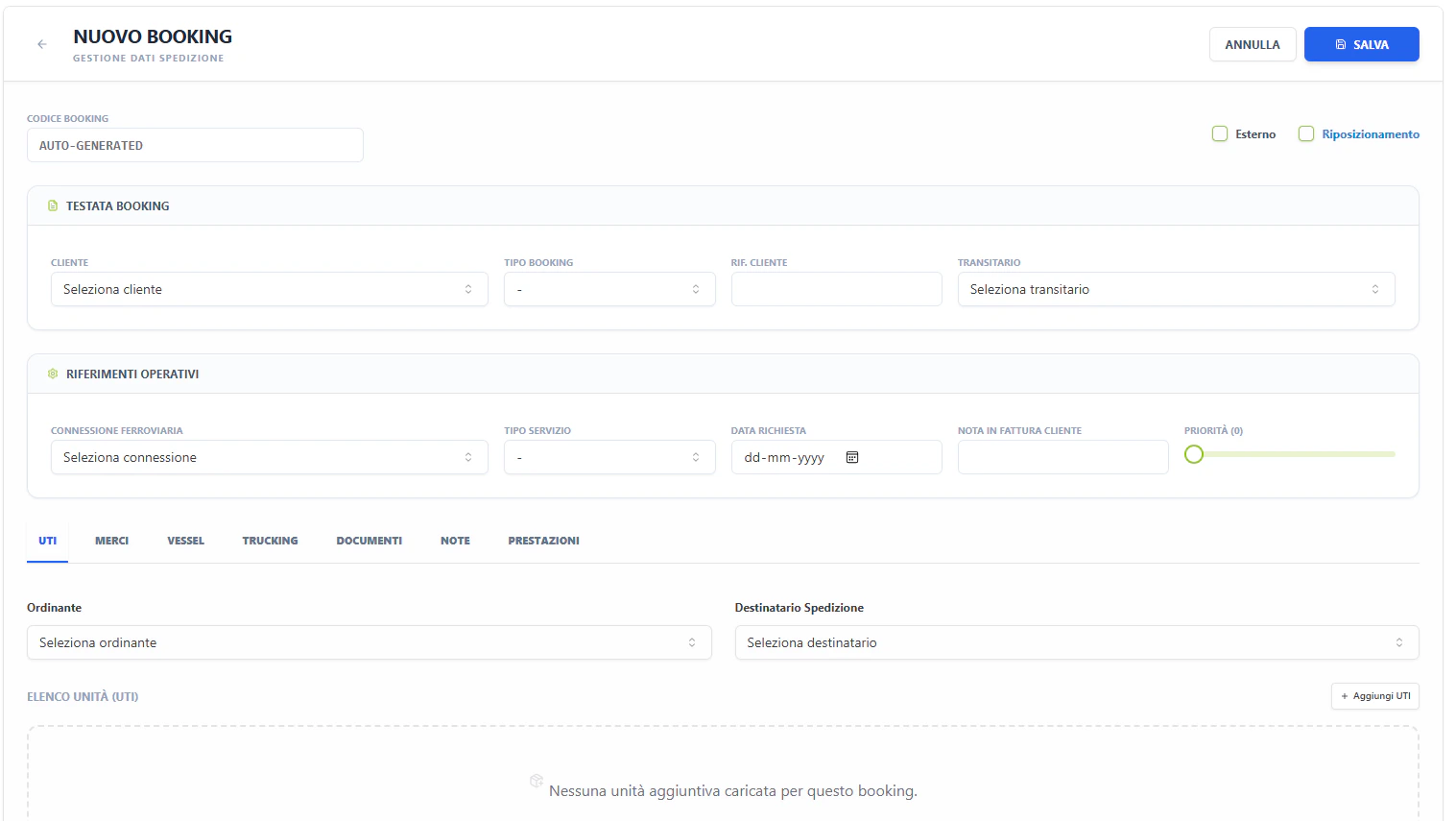 ## 2. Technical Field Mapping (Nuovo Booking)
The booking form is a complex multi-tab interface designed for high-density data entry.
### Header & References
| Field | HTML Name | Nature | Source |
| :---------------- | :--------------- | :----------- | :----------------------- |
| **Cliente** | `id_soggetto` | Autocomplete | **Generale > Soggetti** |
| **Connessione** | `id_connessione` | Select | **Design > Connessioni** |
| **Data Servizio** | `data_slot` | Datepicker | Operational Calendar |
| **Rif. Cliente** | `rif_cliente` | Text | Manual Entry |
### Search & Filters (Gestione Booking)
The list view provides cross-modular filtering for commercial and operational tracking.
| Filter Label | Technical Name | Source Data (ID) | Created In | Flow/Logic |
| :---------------- | :--------------- | :--------------- | :----------------------- | :--------------------------------- |
| **Servizio** | `id_servizio` | `servizi` | **DESIGN > Servizi** | Commercial service line filtering. |
| **Connessione** | `id_connessione` | `connessioni` | **DESIGN > Connessioni** | Specific route filtering. |
| **Tipo UTI** | `id_tipo_uti` | `tipi_uti` | **GENERALE > UTI** | Filters by equipment class. |
| **Cliente** | `id_cliente` | `soggetti` | **GENERALE > Soggetti** | Filtered by Role: *Cliente*. |
| **Trasportatore** | `id_vettore` | `soggetti` | **GENERALE > Soggetti** | Filtered by Role: *Trasportatore*. |
| **Stato Booking** | `stato_booking` | `stati_booking` | **System State Machine** | Commercial status of the order. |
### Functional Tabs
#### UTI (Units)
Defines the physical equipment. Each booking can contain multiple UTI rows.
* **Tipo UTI**: Selection from the technical equipment registry (`id_tipo_uti`).
* **Matricola**: Autocomplete lookup for individual units in the fleet.
* **Hazard Flags**: Toggles for **ADR/RID** (Dangerous Goods) and **CER** (Waste), triggering document requirements.
#### Merci (Goods)
Detailed cargo specification for customs and safety.
* **Descrizione Merce**: Autocomplete lookup from the system's Goods database.
* **Codice HS**: Automated or manual entry of Harmonized System codes.
* **Net/Gross Weights**: Critical inputs that drive the train composition's weight validation.
#### Trucking (Road Legs)
Configures the first and last-mile pickup/delivery.
* **Fornitore**: Selecting the hauler from the Subjects registry.
* **Missions**: Defines whether the leg is for specialized transport or standard positioning.
#### Prestazioni (Services)
Management of accessory services (e.g., weighing, storage, customs). Linkage of costs and revenues directly to the booking record.
## 3. The Status Matrix (Visual Indicators)
The Booking table uses a "Diamond Matrix" to represent sub-module readiness at a glance:
1. **BK (Booking)**: Commercial confirmation status.
2. **TR (Train)**: Rail planning and execution status.
3. **TT (Truck)**: Trucking dispatch status.
4. **DO (Doc)**: Mandatory documentation status.
**Color Logic**:
*
## 2. Technical Field Mapping (Nuovo Booking)
The booking form is a complex multi-tab interface designed for high-density data entry.
### Header & References
| Field | HTML Name | Nature | Source |
| :---------------- | :--------------- | :----------- | :----------------------- |
| **Cliente** | `id_soggetto` | Autocomplete | **Generale > Soggetti** |
| **Connessione** | `id_connessione` | Select | **Design > Connessioni** |
| **Data Servizio** | `data_slot` | Datepicker | Operational Calendar |
| **Rif. Cliente** | `rif_cliente` | Text | Manual Entry |
### Search & Filters (Gestione Booking)
The list view provides cross-modular filtering for commercial and operational tracking.
| Filter Label | Technical Name | Source Data (ID) | Created In | Flow/Logic |
| :---------------- | :--------------- | :--------------- | :----------------------- | :--------------------------------- |
| **Servizio** | `id_servizio` | `servizi` | **DESIGN > Servizi** | Commercial service line filtering. |
| **Connessione** | `id_connessione` | `connessioni` | **DESIGN > Connessioni** | Specific route filtering. |
| **Tipo UTI** | `id_tipo_uti` | `tipi_uti` | **GENERALE > UTI** | Filters by equipment class. |
| **Cliente** | `id_cliente` | `soggetti` | **GENERALE > Soggetti** | Filtered by Role: *Cliente*. |
| **Trasportatore** | `id_vettore` | `soggetti` | **GENERALE > Soggetti** | Filtered by Role: *Trasportatore*. |
| **Stato Booking** | `stato_booking` | `stati_booking` | **System State Machine** | Commercial status of the order. |
### Functional Tabs
#### UTI (Units)
Defines the physical equipment. Each booking can contain multiple UTI rows.
* **Tipo UTI**: Selection from the technical equipment registry (`id_tipo_uti`).
* **Matricola**: Autocomplete lookup for individual units in the fleet.
* **Hazard Flags**: Toggles for **ADR/RID** (Dangerous Goods) and **CER** (Waste), triggering document requirements.
#### Merci (Goods)
Detailed cargo specification for customs and safety.
* **Descrizione Merce**: Autocomplete lookup from the system's Goods database.
* **Codice HS**: Automated or manual entry of Harmonized System codes.
* **Net/Gross Weights**: Critical inputs that drive the train composition's weight validation.
#### Trucking (Road Legs)
Configures the first and last-mile pickup/delivery.
* **Fornitore**: Selecting the hauler from the Subjects registry.
* **Missions**: Defines whether the leg is for specialized transport or standard positioning.
#### Prestazioni (Services)
Management of accessory services (e.g., weighing, storage, customs). Linkage of costs and revenues directly to the booking record.
## 3. The Status Matrix (Visual Indicators)
The Booking table uses a "Diamond Matrix" to represent sub-module readiness at a glance:
1. **BK (Booking)**: Commercial confirmation status.
2. **TR (Train)**: Rail planning and execution status.
3. **TT (Truck)**: Trucking dispatch status.
4. **DO (Doc)**: Mandatory documentation status.
**Color Logic**:
* **Green**: Complete / Dispatched.
**Yellow**: Pending / Planned.
**Red**: Problem / Rejected.
**Gray**: Not applicable.