> ## Documentation Index
> Fetch the complete documentation index at: https://docs.wavecentric.ai/llms.txt
> Use this file to discover all available pages before exploring further.
# Planning Dashboard
> Operational Command Center for network planners
 ## 1. Overview
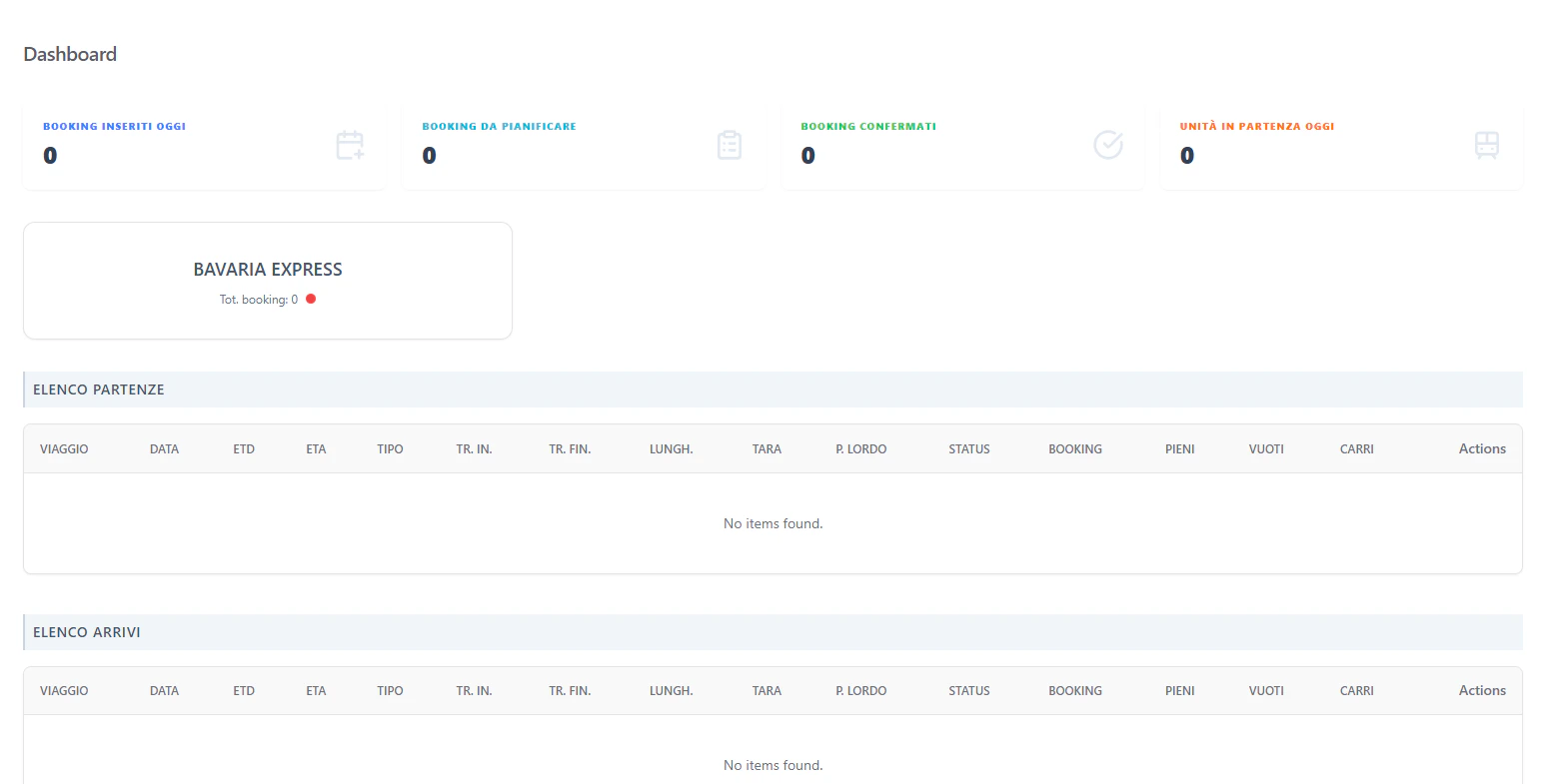
The **Planning Dashboard** is the primary entry point for logistics operators. It provides a real-time, high-level summary of the network's commercial intake and operational output.
## 2. Operational KPIs
The dashboard displays four critical counters driven by real-time database queries:
| Counter | Metric | Technical Source |
| :-------------------- | :--------- | :--------------------------------------------------- |
| **Booking Inseriti** | Volume | Count of records in `MAGEMO_BOOKINGS` created today. |
| **Da Pianificare** | Backlog | Bookings with status `DRAFT` or `PENDING`. |
| **Confermati** | Readiness | Bookings flagged as `CONFIRMED`. |
| **Unità in Partenza** | Throughput | Sum of Full/Empty units on trains departing today. |
## 3. Daily Rail Schedule
The dashboard provides a consolidated view of today's movements.
### Arrivi & Partenze (Pratiche)
| Field | Name | Description |
| :---------------- | :---------------- | :------------------------------------------------ |
| **Viaggio** | `viaggio` | The unique train trip identifier. |
| **ETD / ETA** | `etd` / `eta` | Expected Time of Departure/Arrival. |
| **Pieni / Vuoti** | `pieni` / `vuoti` | Count of Full vs Empty intermodal units. |
| **Status** | `status` | Semaphore indicator (Green/Red/Amber) for delays. |
## 4. Interaction Flow
```mermaid theme={null}
graph TD
D[Dashboard] -->|Click Counter| B[Booking List: Filtered]
D -->|Click Service Card| S[Service Details]
D -->|Click Train Row| E[Execution Portal]
```
### Direct Actions
* **Trip Monitoring**: Planners can jump directly into the loading list of a departing train to verify final container assignments.
* **Service Health**: Visual "Service Cards" highlight how many bookings are assigned to each major corridor (e.g., Trieste-Munich).
## 1. Overview
The **Planning Dashboard** is the primary entry point for logistics operators. It provides a real-time, high-level summary of the network's commercial intake and operational output.
## 2. Operational KPIs
The dashboard displays four critical counters driven by real-time database queries:
| Counter | Metric | Technical Source |
| :-------------------- | :--------- | :--------------------------------------------------- |
| **Booking Inseriti** | Volume | Count of records in `MAGEMO_BOOKINGS` created today. |
| **Da Pianificare** | Backlog | Bookings with status `DRAFT` or `PENDING`. |
| **Confermati** | Readiness | Bookings flagged as `CONFIRMED`. |
| **Unità in Partenza** | Throughput | Sum of Full/Empty units on trains departing today. |
## 3. Daily Rail Schedule
The dashboard provides a consolidated view of today's movements.
### Arrivi & Partenze (Pratiche)
| Field | Name | Description |
| :---------------- | :---------------- | :------------------------------------------------ |
| **Viaggio** | `viaggio` | The unique train trip identifier. |
| **ETD / ETA** | `etd` / `eta` | Expected Time of Departure/Arrival. |
| **Pieni / Vuoti** | `pieni` / `vuoti` | Count of Full vs Empty intermodal units. |
| **Status** | `status` | Semaphore indicator (Green/Red/Amber) for delays. |
## 4. Interaction Flow
```mermaid theme={null}
graph TD
D[Dashboard] -->|Click Counter| B[Booking List: Filtered]
D -->|Click Service Card| S[Service Details]
D -->|Click Train Row| E[Execution Portal]
```
### Direct Actions
* **Trip Monitoring**: Planners can jump directly into the loading list of a departing train to verify final container assignments.
* **Service Health**: Visual "Service Cards" highlight how many bookings are assigned to each major corridor (e.g., Trieste-Munich).