
What It Does
The notification system automatically creates activity entries for all operations that modify the database or trigger important events. This includes:- Database table and field management (create, update, delete)
- Email communications (sent, received, replied)
- Customer interactions (new quotes, service requests)
- User invitations and team changes
- Task assignments and updates
- CreditSafe report generations
- System-wide administrative actions
db_ai-loop_System_Notifications and displayed on the user’s home page feed.
Notification Types
View Once
Informational updates about routine activities:- “New table created in datalake”
- “Column added to customer database”
- “Row updated in tasks collection”
Accept Once
Important events requiring user acknowledgment:- “Customer email received - requires response”
- “New service request submitted”
- “Task deadline approaching”
Feed Interface
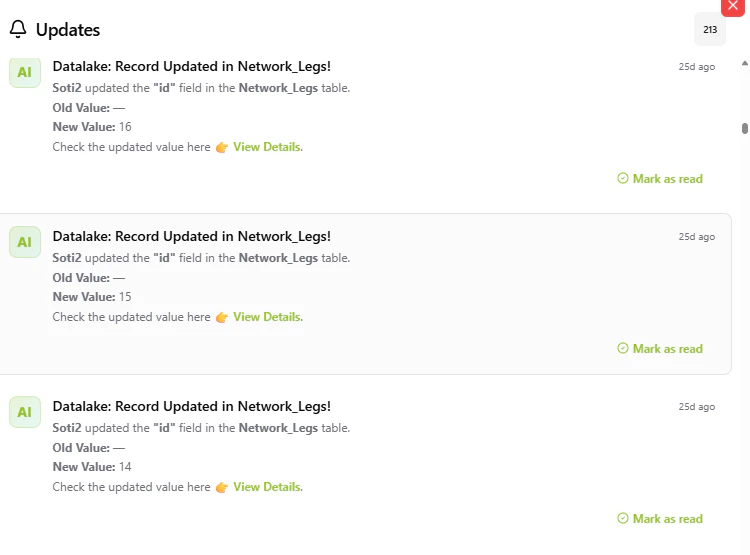
Feed Structure
Each notification shows:- Title: Bold, attention-grabbing summary with emojis
- Message: Detailed description with relevant data and links
- Timestamp: Relative time (“5 minutes ago”, “2 hours ago”)
- Action Button: “Okay, Got it!” for
accept_oncenotifications
Display Logic
- Shows all notifications where
read: "no"for the current user’s email - Sorted by timestamp (most recent first)
- Updates in real-time as new notifications arrive
Dual Notification System
For database operations, the system creates two notifications:-
User Confirmation: Sent to the person who performed the action
- Confirms successful completion
- Includes summary of changes made
- Links to view updated data
-
Admin Alerts: Sent to all admin team members with
receive_notifications: yes- Details the operation and user who performed it
- Provides context and change details
- Enables oversight and audit trail
How It Works
Notification Creation
When a database operation or important event occurs:- Event Trigger: System detects the operation (webhook, API call, or internal action)
- User Lookup: Identifies relevant recipients based on email and team settings
- Message Generation: Creates personalized title and HTML-formatted message
- Database Insert: Stores notification in
db_ai-loop_System_Notifications - Feed Display: Notification appears immediately in user’s feed
Notification Dismissal
View Once (Hover to Dismiss):- User hovers mouse over the notification
- System makes API request to update
read: "yes" - Notification removed from feed instantly
- User clicks “Okay, Got it!” button
- API request updates
read: "yes" - Confirmation animation before removal