
Unified Inquiry Management
Consolidate requests from disparate channels into a standardized operational flow:- Multichannel Identification: Instant visual indicators distinguish inquiries originating via Email, Phone, or Electronic Form.
- Real-time Status Synchronization: The dashboard updates instantly, ensuring all operational changes are visible to authorized users.
Precision Data Navigation
Advanced Filtering & Search
Manage large volumes of logistics data with granular control:- Global Search Engine: Locate specific records using Inquiry IDs, sender identities, or corporate names.
- Categorical Filtering: Isolate requests by Funnel Stage (e.g., Lead, Qualified), Operational Status (e.g., Open, Pending), or specific Business Partners.
- Channel-Specific Views: Focus on specific communication streams to optimize response workflows.
Dynamic Workflow Execution
Modify operational parameters directly within the interface:- Inline Orchestration: Update funnel stages and internal statuses via integrated dropdown menus.
- Persistent State Sharing: URL synchronization allows for the sharing of specific filtered views by simply copying the browser address.
Intelligence Layers
Corporate & User Intelligence
Access deep-level metadata without navigating away from the dashboard:- User Information Modal: Clicking a sender’s name reveals professional contact details, job title, account type, and verified geographic location.
- Embedded User Summary: A quick-access popover within the inquiry record provides an immediate snapshot of the requester’s corporate context.
- Automated Business Reporting: Selecting a customer name triggers the
Centrico Customer Viewflow, generating a real-time intelligence report based on aggregated platform data.
Detailed Service View
Opening a specific inquiry record provides a 360-degree view of the technical requirements:- Journey Orchestration: Visual mapping of the logistics route, including origin, destination, total distance, and terminal handling requirements.
- Technical Cargo Specifications: Captured data for specialized transport, including NHM Codes, ADR Classes (Dangerous Goods), UN Codes, and CER Codes (Waste).
- Unit Configuration: Detailed breakdown of shipping units, including type, size, weight, and constraints like Craneability.
Inquiry Creation
Authorized users can initiate new service requests directly from the dashboard using three specialized entry points:- Ask Inquiry (AI Assistant): Engage with a conversational AI interface to draft complex logistics requests through natural language.
- Draft Request: A streamlined form for quickly capturing essential contact information and a brief message to initiate the inquiry process without a full route specification.
- New Inquiry (Enhanced): A comprehensive, multi-step orchestration wizard for detailed logistics planning:
- Route Selection: Geospatial mapping to identify origin, destination, and stopover points.
- Path Identification: Review and select from multiple calculated logistics routes.
- Service Configuration: Define service types (Door-to-Door, Terminal-to-Terminal) and specific terminal handling needs.
- Technical Specification: Input granular cargo data, intermodal unit details, and loading constraints.
Core Functionalities
Explore the dedicated documentation for each specialized inquiry creation path:Enhanced New Inquiry
Complete structured orchestration for complex logistics requirements.
AI Assisted (Ask AI)
Natural language processing to convert descriptions into structured inquiries.
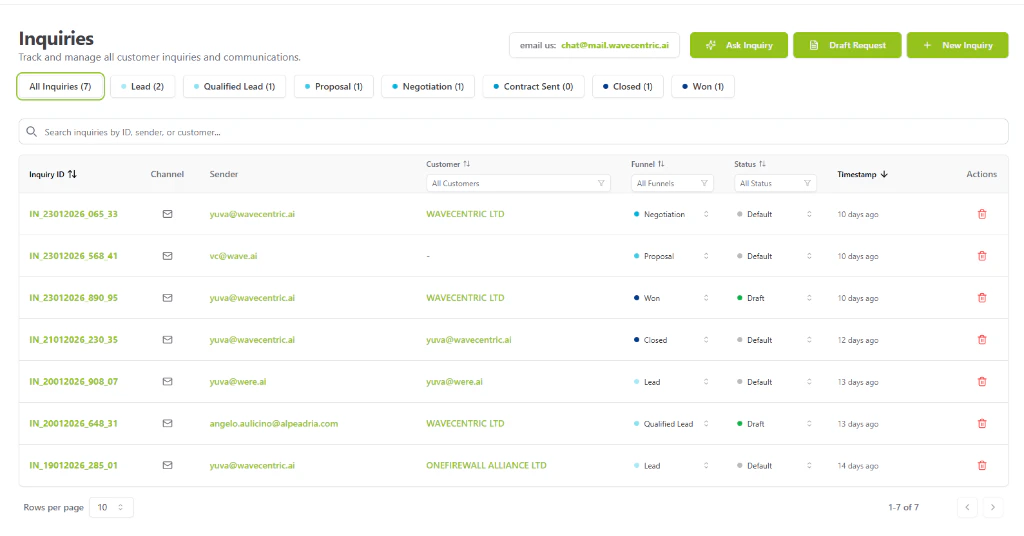
The AI Loop Inquiries Dashboard interface with integrated intelligence and filtering.