
Step 1: Route Selection
Powered by integrated geospatial intelligence, this stage identifies the primary transit points of your shipment:- Origin & Destination: Precise location identification for both pickup and final delivery.
- Stop-over (Optional): Inclusion of transit hubs or secondary collection points.
- Visual Mapping: Real-time geospatial visualization of the selected logistics path.
Step 2: Choose Your Path
Review and select from multiple calculated logistics routes:- Multi-Modal Analysis: The system evaluates available paths across Rail, Road, Sea, and Air.
- Route Summary: View distance metrics and transport legs for each possible orchestration path.
Step 3: Select Service Type
Define the operational parameters of the transport:- Service Categories: Select from Door-to-Door, Door-to-Terminal, Terminal-to-Door, or Terminal-to-Terminal.
- Terminal Handling: Configure specific handling requirements at origin or destination hubs based on the selected service category.
Step 4: Specify Units & Goods
Input granular technical data to finalize the logistics requirement:- Loading Unit Specification: Define intermodal units, including type, size, quantity, and weight.
- Cargo Specifications: Capture specialized data such as NHM Codes, Dangerous Goods (ADR/UN), or Waste (CER).
- Handling Constraints: Specify constraints like Craneability or specific temperature requirements.
Multi-Service Orchestration
The wizard supports high-density inquiries by allowing users to add multiple distinct service requests (the “basket” approach) before final submission. This ensures that complex global supply chain requirements are captured within a single, unified inquiry ID.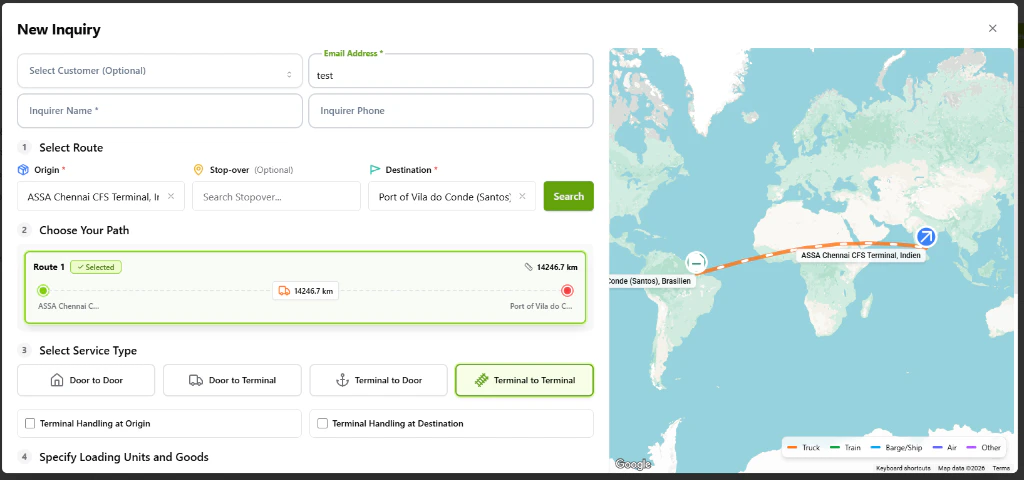
The Enhanced New Inquiry wizard featuring the route selection and multi-modal path identification.