
Inviting a New User
Invitation Steps
Follow these steps to add a new member to your workspace.1
Navigate to Permissions
Navigate to the Settings page and click on Membership & Permissions.
2
Open the Invitation Form
Click the “Invite New User” button to open the invitation modal.
3
Enter Details and Assign a Role
Enter the new user’s email address and select their role from the dropdown menu (Admin or Guest).
4
Send the Invitation
Click “Send Invitation”. An email will be sent to the user with a login link, and their account will be created in a pending state.
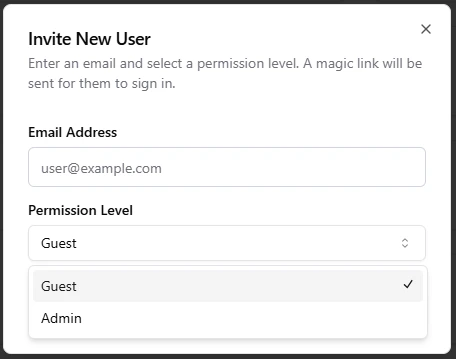
The user invitation modal in AI Loop.