
Personal Profile
Your profile details provide the necessary context for collaborative logistics orchestration.Core Identity
- Name & Surname: Maintain your full professional name for clear identification in tasks and inquiries.
- Contact Details: Update your email (managed via magic links) and optional phone number.
- Job Title & Account Type: Specify your professional role and industry category (e.g., Shipper, Forwarder, Carrier) to optimize platform features.
- Tax Identification: Provide your C.F. (Codice Fiscale) or relevant tax ID for institutional compliance where required.
Company & Verification
- Verified Standing: Your organization’s name is displayed with a (Verified) status once authenticated, ensuring trust within the logistics network.
- Institutional Alignment: Verified company details are locked to maintain the integrity of the corporate registry.
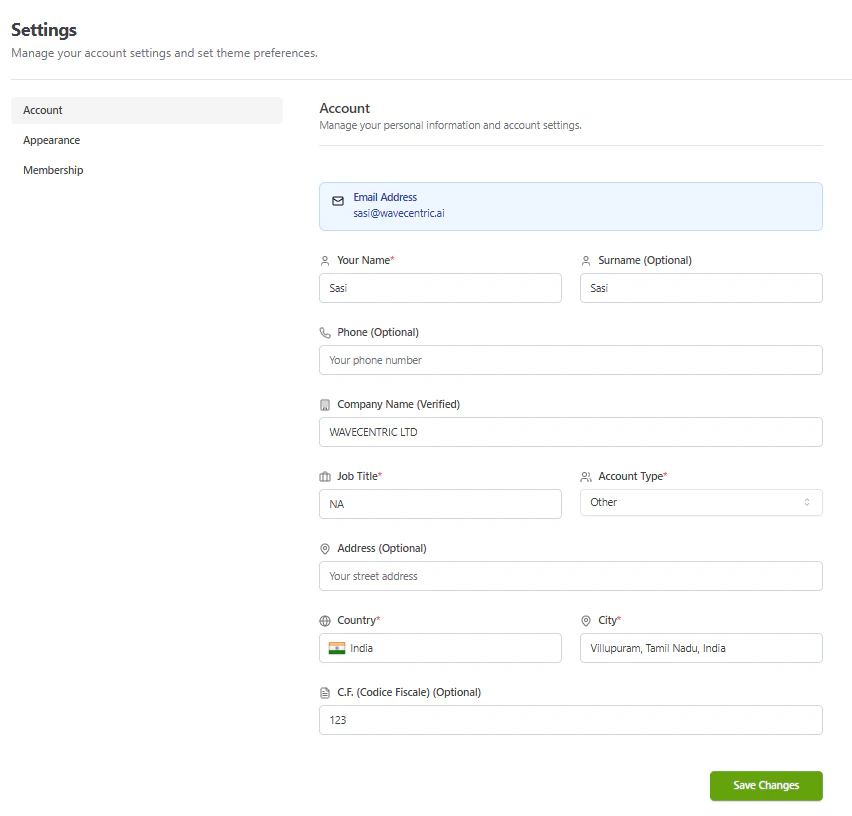
The AI Loop Account Settings interface featuring comprehensive profile orchestration and geospatial validation.
Workspace Customization
Tailor the visual environment to match your professional workflow:- Appearance: Toggle between Light and Dark modes or select high-performance themes (Slate, Rose, Lime).
- Membership Level: Instantly identify your access tier (Admin vs. Guest) within the organization.
User Menu & Session Management
The user profile menu, located at the bottom of the primary navigation sidebar, provides quick access to account controls and session management.User Menu Options
- Profile Overview: View your active email and profile avatar.
- Settings: Direct access to your Account & Membership Settings.
- Theme Selection: Toggle between Light, Dark, and high-contrast visual modes.
- Log Out: Securely terminate your active session and redirect to the login portal.
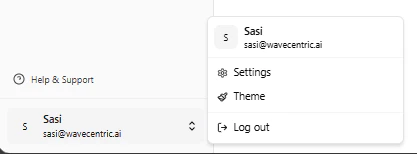
The AI Loop user menu and session management interface.