
Workflow Visualization
Fleet Databases
The system searches across multiple fleet-related databases:db_ai-loop_FLEET_muta: Fleet circulation/rotation data with relationships to railway wagonsdb_ai-loop_FLEET_services: Service definitions and configurationsdb_ai-loop_FLEET_carri: Railway wagon inventory (identified byNUMEROVAGONE)db_ai-loop_FLEET_terminals: Terminal locations and allocations
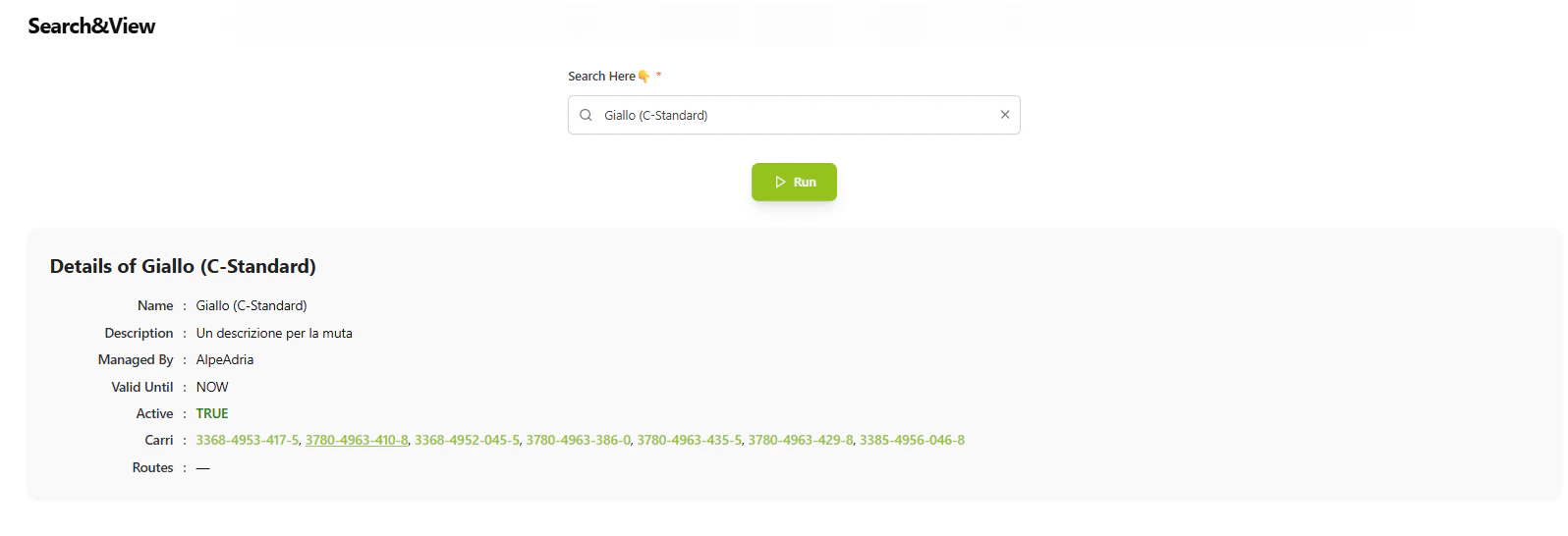
Fleet Search interface with autocomplete search and detailed entity view.
Search Workflow
The fleet search operates through a two-command workflow:1. Main Command - Search Interface
When users access the fleet search feature, the main command executes:- Fetch Searchable Options: Queries all four fleet databases to build a comprehensive search index
- Active & Valid Filtering: Only includes records where:
active = "TRUE"valid_untilis empty, missing, or set to “NOW”
- Autocomplete Creation: Generates a searchable dropdown with all available fleet entities
- Search UI Display: Returns an interactive search interface with autocomplete suggestions
2. Search Command - Detail Retrieval
When users select an item from the search, the search command executes:-
Relationship Mapping: Defines relationships between fleet collections:
- Muta → Carri: Links circulation data to specific railway wagons
- Terminals → Terminal Allocation: Connects terminals to their allocations
- Terminal Allocation → Muta: Links allocations back to circulation data
- Primary Document Retrieval: Fetches the selected entity’s complete details from the database
-
Related Entity Discovery: Automatically finds connected data:
- Parses comma-separated relationship fields
- Retrieves related documents from connected collections
- Builds a relationship graph for navigation
-
HTML Rendering: Generates a formatted output with:
- Clean, professional styling
- Grid-based detail display with labels and values
- Clickable relationship links: Navigate to related entities with a single click
- Timestamp formatting for date fields
- Boolean value highlighting (TRUE in green, FALSE in red)
Key Features
Intelligent Search
- Multi-Database Search: Searches across all fleet databases simultaneously
- Real-Time Autocomplete: Instant suggestions as users type
- Active Record Filtering: Only shows currently valid and active fleet data
Relationship Navigation
The system automatically discovers and displays relationships between fleet entities:- Muta ↔ Carri: View which wagons are part of a circulation
- Terminals ↔ Allocations: See terminal allocation details
- Cross-Collection Links: Navigate seamlessly between related data
Professional UI Output
- Formatted Labels: Automatically formats database field names into readable labels
- Data Type Detection: Recognizes and formats timestamps, booleans, and links
- Responsive Grid Layout: Clean, organized display of all entity details
- Visual Indicators: Color-coded status values for quick scanning
Flow Execution
1
1. User Initiates Search
User accesses the Fleet Search feature, triggering the main command.Action: System queries all fleet databases and builds the autocomplete search index.Output: Interactive search UI with dropdown autocomplete containing all fleet entities.2
2. User Selects Entity
User types or selects a specific fleet entity (wagon, terminal, service, or muta).Input Example: User selects wagon “NUMEROVAGONE: 83123456”Action: Triggers the search command with the selected entity details.3
3. System Retrieves Details
Backend processes the search request:- Loads relationship configuration
- Queries the primary database for the selected entity
- Discovers related entities through foreign key relationships
- Fetches details of all related entities
4
4. Render Interactive Output
System generates HTML response:- Displays all entity details in a formatted grid
- Creates clickable links for related entities
- Applies styling and formatting rules
- Returns the complete HTML to the user interface
Example Use Cases
Viewing Wagon Details
- User searches for wagon number “83123456”
- System displays wagon details (type, status, allocation)
- User clicks on related “muta” link
- System shows the circulation this wagon is part of
Exploring Terminal Allocations
- User searches for terminal “Terminal Milano”
- System displays terminal details and location
- Shows related terminal allocations as clickable links
- User can navigate to see which muta/services are allocated to this terminal
Service Investigation
- User searches for a service by name
- System displays service configuration
- Shows any related terminals or wagons
- Enables full traceability of service deployment