
1. Overview
The Subjects (Soggetti) module is the foundational registry for all entities interacting with the platform. It serves as the single source of truth for identity, financial compliance, and operational roles. Every booking, service, and asset must be linked to a valid Subject, making it the most critical data pillar of the system.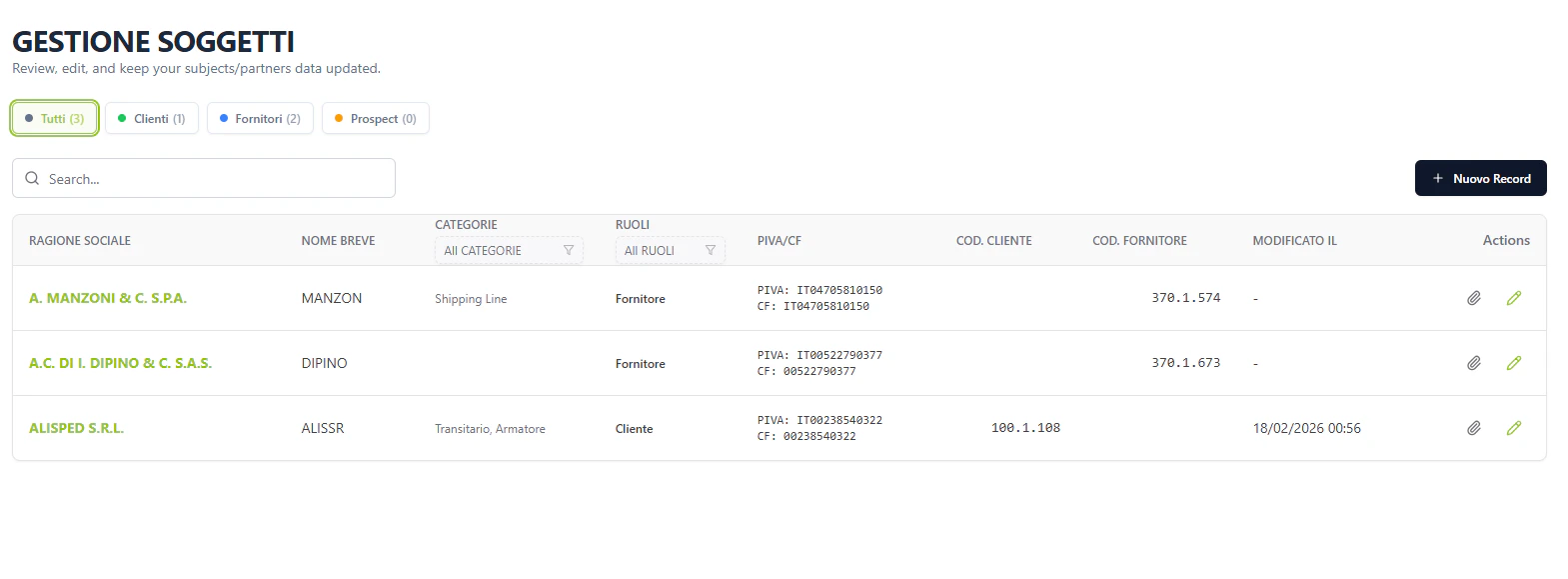
2. Core Functional Pillars
1. Identity & Compliance
Tracks the legal and fiscal metadata for each partner, including:- Fiscal IDs: EORI and P.IVA (VAT) codes.
- Categorization: Defines if a subject is an Agente, MTO, Carrier (Vettore), or Terminal Operator (Terminalista).
- ERP Synchronization: Automated syncing of codes (Customer/Supplier) with external financial systems. Last sync timestamps are visible in the header for transparency.
2. Personnel Registry (Contatti)
A 1:N relationship listing key personnel within each subject. Contacts are categorized by:- Tipologia: Booking, Administration, Operations.
- Ufficio: Import, Export.
- Context: Main Referent vs. Information Only. This ensures operational notifications reach the correct departments automatically.
3. Service Authorization (Connessioni)
The connection matrix determines which specific service lines are available for a partner. This acts as a security gateway for collaboration, preventing unauthorized bookings for specific routes.4. Infrastructure Mapping (Magazzini)
Links subjects to specific Nodes (Terminals/Stations), establishing ownership or stakeholder relationships. This enables features like Storage Threshold Alerts (Soglia stock).3. Operational Logic & Data Security
The Subjects module is the “Identity Provider” for Magemo. It enforces business rules through several technical mechanisms:I. Role-Based Visibility
The system uses thecategorie tags to drive UI availability.
- If a subject is not tagged as Vettore, they will not appear in the Execution > Rail carrier selection dropdown.
- If a subject is not tagged as Cliente, they cannot be selected as the primary
id_soggettoin a Booking.
II. Financial Safeguards
By linking subjects to external ERP IDs (erp_codice_cliente), the system ensures that every booking is credited to a valid account. If a subject lacks an ERP code, the Admin module may flag their bookings as “Pro-forma” or block invoicing.
III. Notification Resolution
The Contatti sub-registry is the engine for PDF dispatch. When a CIM or Manifest is generated, the system looks at the Vettore linked to the trip, finds its contacts withTipologia = Operations, and automatically attaches them to the email queue.
4. Data Connectivity & Flow
5. Field Mapping Reference
Registry List (Gestione Soggetti)
Form Detailed Sections (Nuovo Soggetto)
Anagrafica (Core Identity)
- Names:
ragsoc(Required),nomebreve(Required). - Address: Full administrative and fiscal address including country codes (
paeseamministrativo,paesefiscale). - Fiscal: PIVA (VAT), CF (Fiscal Code), EORI Code (Critical for customs).
Contatti (The Notification Registry)
Magazzini & Connessioni (Network Boundaries)
- Magazzini: Links to Nodi via
magazzino_luogo. Tracks ownership relationships. - Connessioni: Binary gateway (
1/0) that enables or disables specific commercial service lines for this customer. - Transcodifiche: External system IDs like
codice_ediandcodice_uirrused for inter-system handshakes.