
Workflow Visualization
Key Features
1. View By - Interactive Data Visualization
Generate dynamic bar charts to visualize wagon distribution across any attribute: Available Grouping Fields:- PESO: Weight distribution
- PORTATA: Capacity grouping
- ASSI: Axle configuration
- LUNGHEZZA: Length categories
- MODELLO: Model types
- TIPO: Wagon types
- FORNITORE: Supplier distribution
- Wagon_Keeper: Keeper assignments
- POSIZIONE: Current positions
- Interactive ECharts-powered visualization
- Automatic count aggregation per group
- Professional styling with customizable colors
- Responsive design with tooltips
- Clear axis labels and title
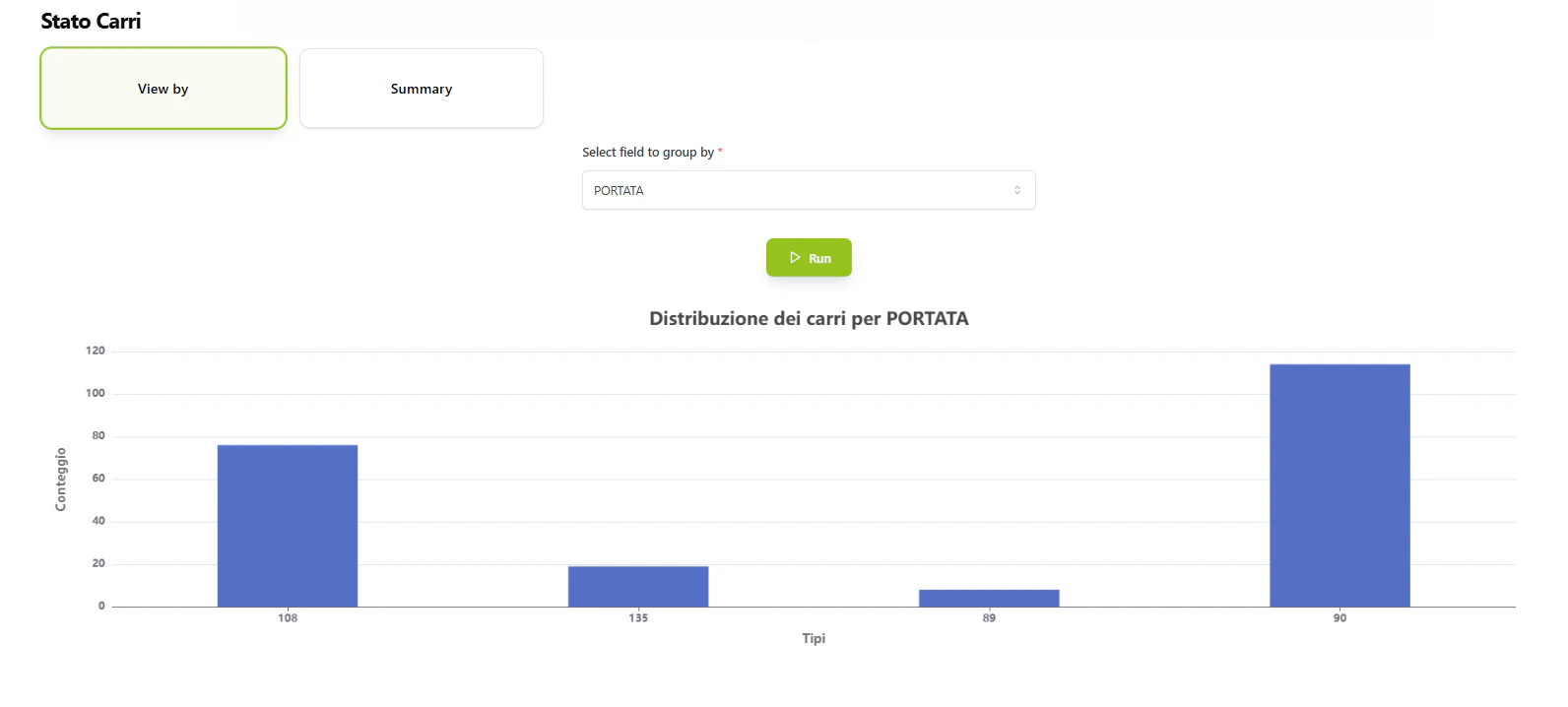
Interactive bar chart showing wagon distribution grouped by selected field.
2. Summary - AI-Powered Fleet Analysis
Generate comprehensive executive summaries using AI analysis: Summary Includes:- Total number of wagons (owned vs. managed breakdown)
- Complete list of wagon IDs (NUMEROVAGONE)
- Key operational details for each wagon
- Critical patterns and upcoming deadlines
- Management-relevant insights
- Analyzes all wagon documents from
db_ai-loop_FLEET_carri - Extracts critical fields: ECM, ASSI, PESO, TIPO, MODELLO, PORTATA, contract details, and more
- Generates concise, professional summaries for quick decision-making
- Identifies time-sensitive information relative to current date
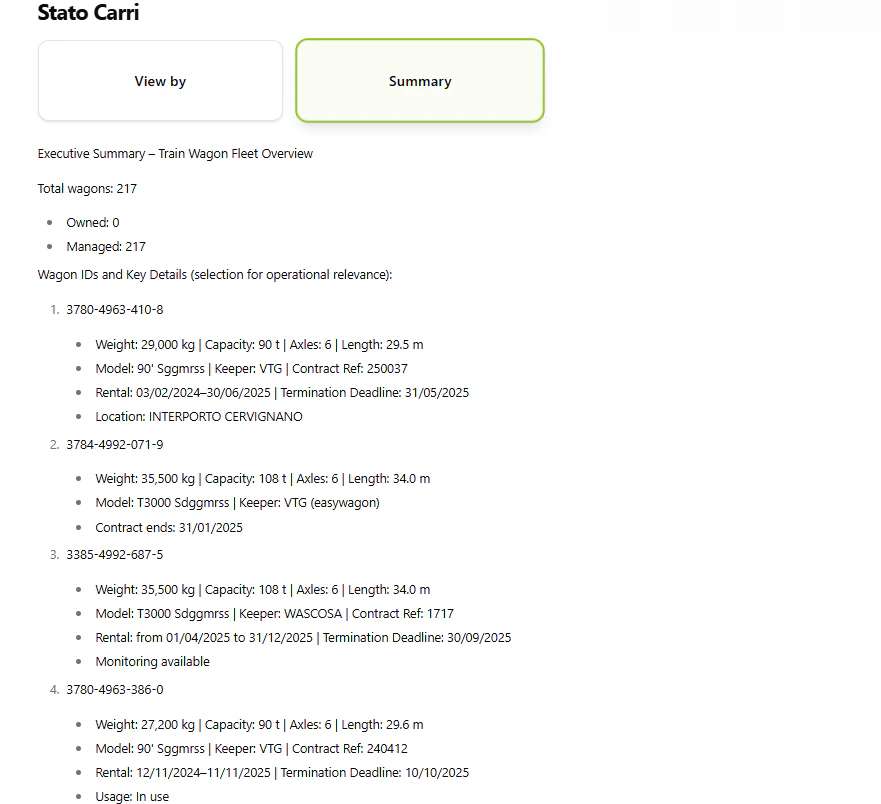
AI-generated executive summary of fleet status with key insights.
Workflow Details
1
1. User Selects Action
User accesses the Fleet Status feature and chooses between:- View By: Generate visual charts
- Summary: Get AI-powered analysis
2
2a. View By - Chart Generation
User Action: Select a field to group by (e.g., “TIPO” for wagon types)System Process:- Queries
db_ai-loop_FLEET_carricollection - Performs MongoDB aggregation: groups by selected field and counts records
- Sorts results by field value
- Generates ECharts configuration with:
- X-axis: Field values (wagon types, models, etc.)
- Y-axis: Count of wagons
- Title: “Distribuzione dei carri per [Field]”
- Returns interactive HTML chart
3
2b. Summary - AI Analysis
System Process:- Fetches all documents from
db_ai-loop_FLEET_carriwith projection:- Wagon identifiers: NUMEROVAGONE, ECM
- Physical attributes: ASSI, PESO, TIPO, MODELLO, PORTATA, LUNGHEZZA
- Operational data: POSIZIONE, monitoring, Wagon_Keeper
- Contract info: FORNITORE, Rif_Contratto, INIZIO_NOLEGGIO, Termine_Disdetta
- Maintenance: Scadenza, KM_rimanenti, Eventuali_limitazioni_Km
- Special equipment: Special_Equipment_POWER_BOX, Special_Equipment_ALTRO
- Sends data to AI with specialized logistics prompt
- AI analyzes and generates summary covering:
- Total wagon count (owned vs. managed)
- Wagon IDs and key details
- Critical patterns and deadlines
- Converts markdown response to HTML
- Returns formatted executive summary
4
3. Display Results
- Charts: Rendered in browser with full interactivity (hover tooltips, zoom, etc.)
- Summary: Displayed as formatted HTML with proper headings and structure
- Both outputs are optimized for quick scanning and decision-making
Use Cases
Operations Management
- Quick Distribution Check: Use “View By TIPO” to see wagon type distribution
- Supplier Analysis: Group by “FORNITORE” to analyze supplier allocation
- Location Overview: View by “POSIZIONE” to understand fleet positioning
Executive Reporting
- Fleet Status Report: Generate AI summary for weekly management meetings
- Contract Review: Summary highlights upcoming contract deadlines and renewal dates
- Maintenance Planning: AI identifies wagons approaching service limits
Strategic Planning
- Capacity Analysis: View by “PORTATA” to understand capacity distribution
- Model Assessment: Group by “MODELLO” to analyze fleet composition
- Keeper Allocation: View by “Wagon_Keeper” to review keeper assignments